Page 10 of 17
Re: [Weapon] mk19 [WIP]
Posted: 2010-02-04 03:56
by Wilkinson
[R-DEV]Rhino wrote:you most likley have a dodgy script installed, probably the multi object UVer (I've always found it really screwy, why I dont use it) and just uninstall that + any other scripts and see if it helps.
in not, reinstall max.
Will try. Apperciate the help

.
Re: [Weapon] mk19 [WIP]
Posted: 2010-02-05 00:27
by Wilkinson
Quick Update.
Any suggestions on improvement at the moment?

Re: [Weapon] mk19 [WIP]
Posted: 2010-02-05 00:33
by Rhino
yes, use less auto UVing and more manual and use the space between all the bits as much as possible.
EDIT: also use texporter to show your UVs since you can see them much more clearly than just a screenshot.
http://www.cuneytozdas.com/software/3dsmax/
Re: [Weapon] mk19 [WIP]
Posted: 2010-02-05 00:39
by ingo
man i would like to see a mark 19 on a humvee in PR

looks good

Re: [Weapon] mk19 [WIP]
Posted: 2010-02-05 00:41
by Tim270
Get rid of all that empty space!

Re: [Weapon] mk19 [WIP]
Posted: 2010-02-05 00:50
by shribey22
Every time I see this weapon I think of Far Cry 2 and the massive firepower it had. Can't wait to see it in PR!
Re: [Weapon] mk19 [WIP]
Posted: 2010-02-05 01:52
by Wilkinson
'[R-DEV wrote:Rhino;1254973']yes, use less auto UVing and more manual and use the space between all the bits as much as possible.
EDIT: also use texporter to show your UVs since you can see them much more clearly than just a screenshot.
Cuneyt Ozdas Software

T-exporter.
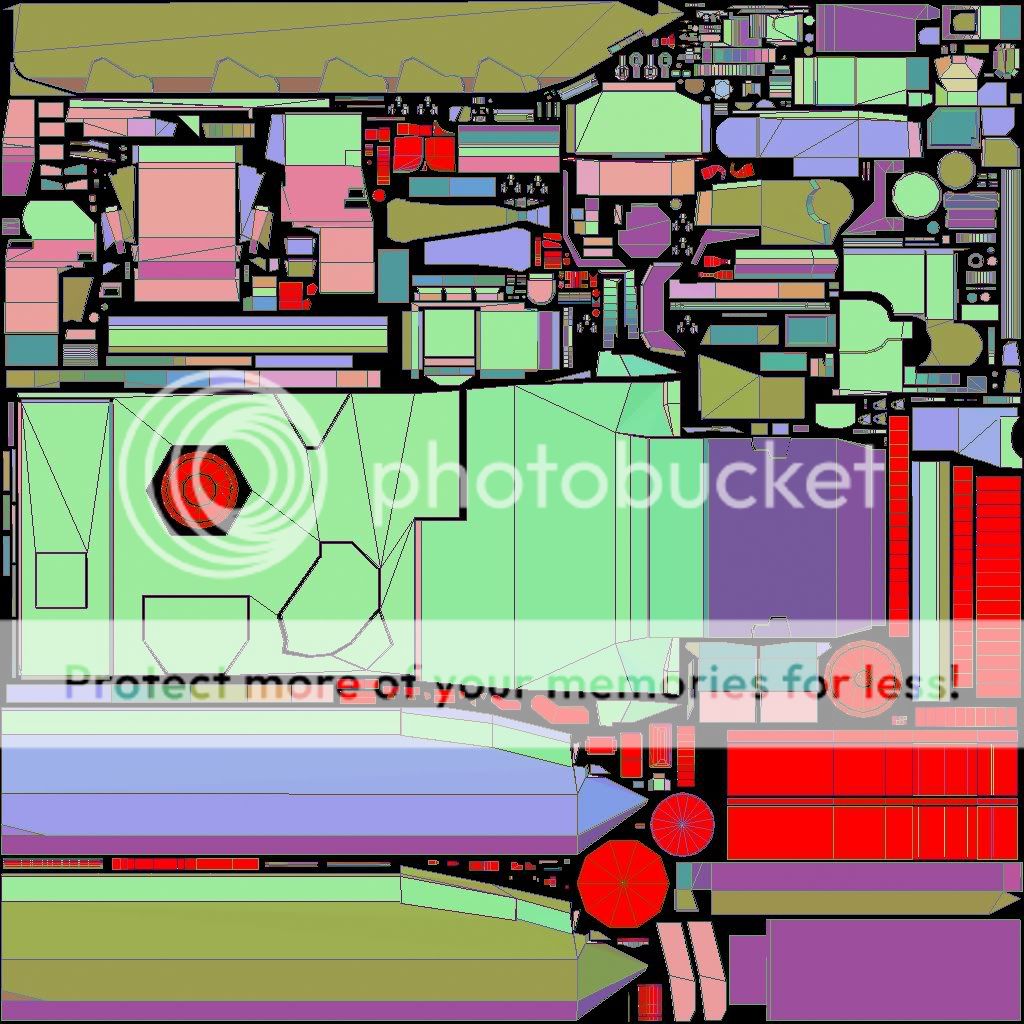
I don't know what this means but it doesn't look to great. I'll do some research on it and learn what it means. I have no idea :/
Manual Attachments have begun though
Re: [Weapon] mk19 [WIP]
Posted: 2010-02-05 02:17
by Drav
Any black space is pixels being loaded into memory, yet not being used to colour your model. Likewise, the smaller your sections are on the texture sheet, the lower resolution they are. You need the sections that need the most detail to have lots of space, the undersides and the bits that rarely get seen can have less, and you need as little unused spce as possible.
Look at Kaijleors UV example and compare it to yours....that should highlight what needs to be altered.
Re: [Weapon] mk19 [WIP]
Posted: 2010-02-05 16:36
by motherdear
if your uv maps get screwed when you attach it is most likely because you forget to collapse the uvw map before the attachment. this can seriously screw up the uvw map of the items attached (next to useless)
as said before you got a serious waste of texture space and you really need to get another proper uvw map test material on the model because you could very well have hidden problems when the color boxes are so big.
also repack that thing again. if you got so much waste in the map you need to think about it differently and try rearranging stuff. also you are probably afraid to alter what you have already made and that is why the "improvements" you made are so neglible.
Re: [Weapon] mk19 [WIP]
Posted: 2010-02-05 21:19
by Wilkinson
[R-DEV]motherdear wrote:if your uv maps get screwed when you attach it is most likely because you forget to collapse the uvw map before the attachment. this can seriously screw up the uvw map of the items attached (next to useless)
as said before you got a serious waste of texture space and you really need to get another proper uvw map test material on the model because you could very well have hidden problems when the color boxes are so big.
also repack that thing again. if you got so much waste in the map you need to think about it differently and try rearranging stuff. also you are probably afraid to alter what you have already made and that is why the "improvements" you made are so neglible.
I have no problem with starting. I haven't done any "improvements" yet. More or less just put them on the same sheet. I have moved it all off the sheet and am connecting and basically doing most of it manually. Will look at the UV modifier thing. Thank you
Re: [Weapon] mk19 [WIP]
Posted: 2010-02-06 00:03
by ripptide
Wilkinson wrote:
T-exporter.
I don't know what this means but it doesn't look to great. I'll do some research on it and learn what it means. I have no idea :/
Manual Attachments have begun though
The red portions on you UV template are just areas of overlapping UV's. Nothing to worry about as long as you've intentionally overlapped UV's, such as the faces of road-wheels for vehicles. You can disable it by making sure the "Mark Overlaps" radio button is unchecked. I'd also suggest unchecking the "Backface Cull" selection. As far as color, you can change it from face normals (as you have it) to "Constant color" to get a more even template. Just make sure the "Edges-Edges Only" box is checked so that you get all the mesh lines.
Re: [Weapon] mk19 [WIP]
Posted: 2010-02-06 04:36
by Wilkinson
Started working on some re-mapping of alot of parts. What I have come up with so far.
Please tell me if I'm making progress
.
Hope it's good.


Re: [Weapon] mk19 [WIP]
Posted: 2010-02-11 00:05
by AquaticPenguin
Wilkinson wrote:Started working on some re-mapping of alot of parts. What I have come up with so far.
Please tell me if I'm making progress
.
Hope it's good.
Looks much more compact now, can't give any crits myself so I'll leave it to the guys with more experience. All I will say is the area with the small bits and pieces in seems to have quite a bit of blank space so you might want to try rearranging them some more.
Very good progress, I always found UV mapping very tedious myself
Re: [Weapon] mk19 [WIP]
Posted: 2010-02-11 14:36
by motherdear
 blue
blue
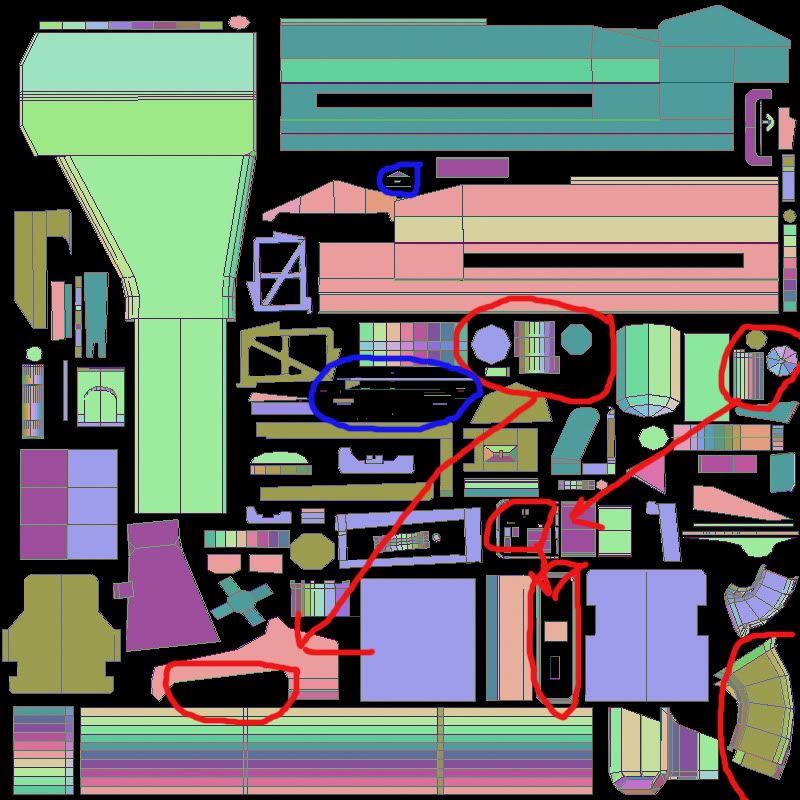
parts need to be redone. small faces like these could be attaches to various model parts most likely, when they are free floating like in the picture adding any detail is almost impossible and you will get all kinds of weird texture flaws ingame etc
red
parts need to be moved or looked over.
WHAT is going on in the bottom right corner
last but not least, very good progress but it can still be optimized a lot more. things can be packed more close and rotated to fit better.
takes a while when not used to it but keep things relatively together and pack closer.
first real uvw is always the worst
Re: [Weapon] mk19 [WIP]
Posted: 2010-02-11 15:43
by Drav
Wilkinson, put the checker material on the model and take a screenshot, Ideally all the checkers should be nice and square and all the same size (ish)
The checker material can be assigned from the top right corner of the UV window.
Re: [Weapon] mk19 [WIP]
Posted: 2010-02-11 16:57
by DankE_SPB
red- isnt it a big overlap?

Re: [Weapon] mk19 [WIP]
Posted: 2010-02-11 21:00
by Wilkinson
'[R-DEV wrote:motherdear;1264132']
blue
parts need to be redone. small faces like these could be attaches to various model parts most likely, when they are free floating like in the picture adding any detail is almost impossible and you will get all kinds of weird texture flaws ingame etc
red
parts need to be moved or looked over.
WHAT is going on in the bottom right corner
last but not least, very good progress but it can still be optimized a lot more. things can be packed more close and rotated to fit better.
takes a while when not used to it but keep things relatively together and pack closer.
first real uvw is always the worst
[R-DEV]Drav wrote:Wilkinson, put the checker material on the model and take a screenshot, Ideally all the checkers should be nice and square and all the same size (ish)
The checker material can be assigned from the top right corner of the UV window.
If you want to see it with checker go to
https://www.realitymod.com/forum/f388-c ... ip-17.html
Thanks guys. Really do appericiate all the help. After talking with some people and discussing some reviews of the model itself and checking the UVs, it was recommended by some people I should start over from the beginning as fixing it would be just more of a problem then to redo. What happened was when I did the Flatten UVs, I had the Angle threshold at 45.0 when it should be at .01. So that was my fault.

I will post up the newer product in a week or two. It's already started
Re: [Weapon] mk19 [WIP]
Posted: 2010-02-11 22:34
by Drav
No you noobzor.....when you alter the scale of the UVs it alters the checker, so when you've re-done the UVs you need to post a NEW picture of the checkboard.
Re: [Weapon] mk19 [WIP]
Posted: 2010-02-12 02:44
by Wilkinson

Your viewing pleasure.
As you can see there are some blemishes here and there.
Nothing the world can't be fixed.
UV Maps posted are most recent of v1.0
the new One is still in progress
Re: [Weapon] mk19 [WIP]
Posted: 2010-02-12 03:11
by Qaiex
Awesome! Going to be deadly as hell! ^^