
I need help improving my FPS. Im playing on a laptop, specs can be find in this link
ASUS F501A-XX118V [F501A-XX118V]: specificaties, reviews, aanbiedingen en meer | Hardware.Info Nederland
Maps like fallujah and ramiel are between 10 and 20 FPS for large parts of the maps which is kinda unplayable.
Im playing on all low settings, except effects, 1366x768. next to that im using gamebooster.
any tips to increase my FPS just a bit would be great. Im also wondering if i could put any settings higher without loosing more FPS
Thanks
help me improve my fps.
-
heldro
- Posts: 85
- Joined: 2011-12-20 22:25
help me improve my fps.
You dont call retarded people retards, its bad taste. You call your friends retards when they are acting retarded.
-
LITOralis.nMd
- Retired PR Developer
- Posts: 5658
- Joined: 2010-04-10 16:15
Re: help me improve my fps.
Intel HD Graphics 3000,
You can try to unpark your cores,
Going further than that is very granular and system specific, you can shift the main PRBF2.exe thread onto a dedicated core, make sure PRMumble is on another core, and give PRBF2.exe High priority using the program I'll list below:
You can download BitSum's ProcessLasso utility,
Quote:
3. Download Bitsum ProcessLasso Free. Make sure you download the correct version, Free 32 bit or Free 64 bit, Process Lasso - Automate and optimize process priorities, CPU affinities, power profiles, and more!
-- Start PR, alt tab to desktop, open ProcessLAsso window, right click on PRBF2.exe, BF2.exe, PRMumble.exe and pnkbstra.exe and pnkbstrB.exe and give them default priority status of High, set the PRBF2.exe and BF2.exe to gaming mode, and give them high or higher access to RAM.
Then you can also assign a core to each, but I've been told by the developer of ProcessLasso that it won't particularly help. The "Gaming Mode" option inside ProcessLasso will do that in a automated and more refined way.
You'll need to
unpark your cores, https://bitsum.com/forum/index.php?topic=1702.0
ParkControl is FREEWARE to tweak and disable Windows CPU core parking!
What is that NUMBER that is shown on the GUI? That is the % of cores that must remain *unparked*. So, if it's 25%, then 75% of the CPU's cores can be parked at once (3 of 4).
For use with PR, set the GUI to 100% on Gaming Mode, so none of the cores are parked.
The Intel HD Graphics 3000, is a weak spot, it's going to be hard to get this to run, you might try setting the graphics level to medium, you could use something like Razer Gamebooster to shutdown background processes, turn off the Aero UI, (basically by making WIndws 7 look like windows XP, you can save 40MB of video RAM, which is the critical bottleneck in your system.
You can try to unpark your cores,
Going further than that is very granular and system specific, you can shift the main PRBF2.exe thread onto a dedicated core, make sure PRMumble is on another core, and give PRBF2.exe High priority using the program I'll list below:
You can download BitSum's ProcessLasso utility,
Quote:
3. Download Bitsum ProcessLasso Free. Make sure you download the correct version, Free 32 bit or Free 64 bit, Process Lasso - Automate and optimize process priorities, CPU affinities, power profiles, and more!
-- Start PR, alt tab to desktop, open ProcessLAsso window, right click on PRBF2.exe, BF2.exe, PRMumble.exe and pnkbstra.exe and pnkbstrB.exe and give them default priority status of High, set the PRBF2.exe and BF2.exe to gaming mode, and give them high or higher access to RAM.
Then you can also assign a core to each, but I've been told by the developer of ProcessLasso that it won't particularly help. The "Gaming Mode" option inside ProcessLasso will do that in a automated and more refined way.
You'll need to
unpark your cores, https://bitsum.com/forum/index.php?topic=1702.0
ParkControl is FREEWARE to tweak and disable Windows CPU core parking!
What is that NUMBER that is shown on the GUI? That is the % of cores that must remain *unparked*. So, if it's 25%, then 75% of the CPU's cores can be parked at once (3 of 4).
For use with PR, set the GUI to 100% on Gaming Mode, so none of the cores are parked.
The Intel HD Graphics 3000, is a weak spot, it's going to be hard to get this to run, you might try setting the graphics level to medium, you could use something like Razer Gamebooster to shutdown background processes, turn off the Aero UI, (basically by making WIndws 7 look like windows XP, you can save 40MB of video RAM, which is the critical bottleneck in your system.
-
heldro
- Posts: 85
- Joined: 2011-12-20 22:25
Re: help me improve my fps.
thanks for your reply, i allready have project lasso installed and have set PR to high priority and gaming mode.
i dont quite understand how this unparking of cores work. when i go to configure cpu core parking where do i see the percentage number you are talking about?
ill also try to put win7 in basic mode.
i dont quite understand how this unparking of cores work. when i go to configure cpu core parking where do i see the percentage number you are talking about?
ill also try to put win7 in basic mode.
You dont call retarded people retards, its bad taste. You call your friends retards when they are acting retarded.
-
LITOralis.nMd
- Retired PR Developer
- Posts: 5658
- Joined: 2010-04-10 16:15
Re: help me improve my fps.
Open ProcessLasso window.
Go to OPtions in Menu bar,
select Configure CPU Core Parking
Click Yes on UAC window.
you will see this window:
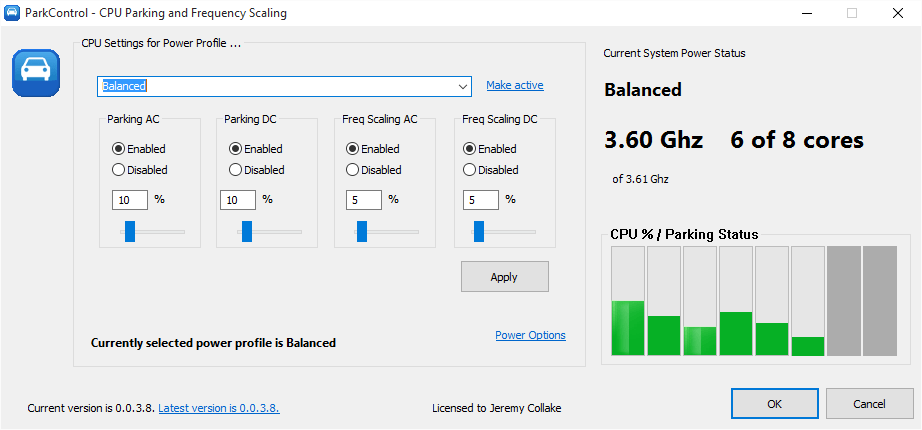
On left, select the Gaming Mode Power Plan.
Then select "Enabled" in the AC power mode.
Then select 100% in the slider.
OPtionally, you can do the same in the Battery power mode too. This will drain your battery quickly.
Click Apply.
If you use Razer GameBooster, you need to do the same thing again, but choose the Razer Gamebooster Power Plan on the left side when you reopen the Configure CPU Core Parking window.
Go to OPtions in Menu bar,
select Configure CPU Core Parking
Click Yes on UAC window.
you will see this window:
On left, select the Gaming Mode Power Plan.
Then select "Enabled" in the AC power mode.
Then select 100% in the slider.
OPtionally, you can do the same in the Battery power mode too. This will drain your battery quickly.
Click Apply.
If you use Razer GameBooster, you need to do the same thing again, but choose the Razer Gamebooster Power Plan on the left side when you reopen the Configure CPU Core Parking window.