
Ok, i'm tired posting in discord with no replies or any actual "help" to fix this problem.
Disclaimer
So here, after i update my PR to 1.7.0.2, PR just went haywire, everytime i play (doesn't matter if it's HOG, VG, Russian PROS, U777) this problem keep showing up.
The Problem
when i join any server, usually it's gonna be normal, i can play normally, like everything is normal, but after around 35 minutes (it's always at this time, 35 MINUTES) my game started to have stutters and my game keep stuttering between normal gameplay and "There's a problem with your connection", if you are thinking this is related to my internet, nada, youtube is normal, discord is normal, mumble is normal, people are doing normal things ingame, not even teleporting or flying into buildings, i can fire my gun (even tho there are no animations, the shots still register to the server). The problem is i cannot do anything other than that, i cannot open the map, the squad menu, leaderboard, commo rose, i cannot even get in vehicles.
i tried everything that i could, changing ISP, Formatting my PC to factory settings, reinstalling PR Countless times, REDOWNLOADING PR, using VPNs and not using them, disabling and enabling DNS, switching to wifi to ethernet and back again, switching to wifi to mobile data, enabling proxies, disabling and enabling firewall, port forwarding, calling my ISP to fix the router, bringing this computer to a repair shop, i've tried EVERYTHING that i could, i just want to play PR man, quarantine has fucked me up and PR is the only way to relax and lay down a bit, at this point i'm just wasting my time and money solving the unsolvable, this update has really fucked me up real bad, not blaming on you devs, you guys have worked hard to provide everything that you guys could do only with donations and you guys have provided me with the best time of my life in the internet and in a game.
Anyways, i really need some help or atleast a fix, i just really want to play this game, there's no other free game like this other than... this game, so that's why i really need help from you guys...
Thanks...
Kato Megumi
6th February 2022, Jakarta, Indonesia
https://youtu.be/v1J8FKYDdjo
https://youtu.be/v1J8FKYDdjo[/youtube]
1.7.0.2 Stuttering on my game (Connection stutter)
-
Kato Megumi
- Posts: 11
- Joined: 2022-03-06 07:36
 1.7.0.2 Stuttering on my game (Connection stutter)
Last edited by Kato Megumi on 2022-03-06 23:19, edited 3 times in total.
-
SemlerPDX
- Posts: 530
- Joined: 2011-01-16 21:49
- Contact:
Re: 1.7.0.2 Stuttering on my game (Connection stutter)
Stuttering after playing for a length of time sounds like a temperature issue without knowing any other details.
Is this a laptop or desktop computer?
You log the temperatures of your CPU/GPU using Hardware Monitor(HWMon), or if you have some other utilities already installed you could use that. Anything upwards of 80+ degrees C would be cause for concern when also experiencing stuttering in game, and while not always a bad thing, it would be an indicator in this situation at least.
Some parts may present this info to Windows Task Manager, so you could check first if temps are available to check there, like this:

Is this a laptop or desktop computer?
You log the temperatures of your CPU/GPU using Hardware Monitor(HWMon), or if you have some other utilities already installed you could use that. Anything upwards of 80+ degrees C would be cause for concern when also experiencing stuttering in game, and while not always a bad thing, it would be an indicator in this situation at least.
Some parts may present this info to Windows Task Manager, so you could check first if temps are available to check there, like this:
-
Kato Megumi
- Posts: 11
- Joined: 2022-03-06 07:36
Re: 1.7.0.2 Stuttering on my game (Connection stutter)
This is not my game stuttering, it's my connection stuttering, i can provide a video in my original post, everything is normal, i can even play rainbow six siege normallt for 2-3 hours without stuttering, but this game, idk why tho, like my connection suddenly just went jittery, everybody is doing their stuff in the game normally, like running, doing assets, building stuff normally, while i'm having a connection problem, usually if you have a connection problem, you wouldn't move right? But i can move!
-
SemlerPDX
- Posts: 530
- Joined: 2011-01-16 21:49
- Contact:
Re: 1.7.0.2 Stuttering on my game (Connection stutter)
I see the video. I see what you are experiencing.
I had a few questions that may help troubleshoot your issue, sometimes these questions may seem redundant or odd, but they may be needed to establish a baseline of items that have been checked or should be checked.
Is that a laptop or desktop computer?
Do you have a means to check the temperatures of various components before and when this is occurring?
(the NIC in a laptop getting too hot, for example, could absolutely cause issues similar to this, which is why I ask)
These are the first things I would ask and check before moving onto other things. Port forwarding should not be required for PR unless you were hosting, though I don't want to assume it would not help - maybe some R-DEV's with more experience can answer that. They're not gonna wanna bend over backwards to help if we can't provide proper information that can be used to troubleshoot the issue, they deal with a ton of pebkac issues already, so let's narrow it down.
Since you last played PR and before you updated to 1.7.0.2 had anything changed (PC hardware or Windows Upgrade/Features Update, etc.)?
Taking shots in the dark until we can gather more details that would help point to the issue or to other questions that will help identify the issue.
I hate to assume, but can you try simply reinstalling the entire game and all updates? This might be best to start with a new/fresh download of the files in case the copies you have are messed up or something... Be sure to make note of your login info or backup your personal profile files to make it easier on yourself after reinstallation.
I had a few questions that may help troubleshoot your issue, sometimes these questions may seem redundant or odd, but they may be needed to establish a baseline of items that have been checked or should be checked.
Is that a laptop or desktop computer?
Do you have a means to check the temperatures of various components before and when this is occurring?
(the NIC in a laptop getting too hot, for example, could absolutely cause issues similar to this, which is why I ask)
These are the first things I would ask and check before moving onto other things. Port forwarding should not be required for PR unless you were hosting, though I don't want to assume it would not help - maybe some R-DEV's with more experience can answer that. They're not gonna wanna bend over backwards to help if we can't provide proper information that can be used to troubleshoot the issue, they deal with a ton of pebkac issues already, so let's narrow it down.
Since you last played PR and before you updated to 1.7.0.2 had anything changed (PC hardware or Windows Upgrade/Features Update, etc.)?
Taking shots in the dark until we can gather more details that would help point to the issue or to other questions that will help identify the issue.
I hate to assume, but can you try simply reinstalling the entire game and all updates? This might be best to start with a new/fresh download of the files in case the copies you have are messed up or something... Be sure to make note of your login info or backup your personal profile files to make it easier on yourself after reinstallation.
-
Coalz101
- Posts: 493
- Joined: 2017-07-03 11:11
Re: 1.7.0.2 Stuttering on my game (Connection stutter)
Wasnt this a VPN/Firewall issue or something?

-
Kato Megumi
- Posts: 11
- Joined: 2022-03-06 07:36
Re: 1.7.0.2 Stuttering on my game (Connection stutter)
Nada, this is not a VPN/Firewall issue, i've tried turning them off and turning them on
-
Kato Megumi
- Posts: 11
- Joined: 2022-03-06 07:36
Re: 1.7.0.2 Stuttering on my game (Connection stutter)
Btw, replying to Semler.
First, this is a laptop.
Second, My CPU is always touching 90-100 degree celcius, but that's normal for a Laptop, especially a gaming laptop, before this problem happened, i always play at those temps too.
Third, i don't exactly remember that i had updated windows around january (the problem started around 22-24th january), i just formatted this pc to try to fix this issue, so no record available on January or past updates other than a couple days ago, and no, i did not upgrade any parts.
i think i have a suspicion here, when i check the temps, usually my laptop provides data like what the hardware that you are using to run this game, yada yada yada, and when i checked it, only the CPU is running the game, the GPU is at 0% usage, which is weird, but i didn't know what have might caused it.
Lastly, i'm still gonna try to re-install it, i just got a 1.6.8.0 installer from someone, so i'm gonna try that, maybe if i try to update it from 1.6.8.0, it's gonna fix the problem, cheers mate, thanks for helping me, like i've been ignored by the devs for like a whole week already in the discord, so that's why i'm running here...
First, this is a laptop.
Second, My CPU is always touching 90-100 degree celcius, but that's normal for a Laptop, especially a gaming laptop, before this problem happened, i always play at those temps too.
Third, i don't exactly remember that i had updated windows around january (the problem started around 22-24th january), i just formatted this pc to try to fix this issue, so no record available on January or past updates other than a couple days ago, and no, i did not upgrade any parts.
i think i have a suspicion here, when i check the temps, usually my laptop provides data like what the hardware that you are using to run this game, yada yada yada, and when i checked it, only the CPU is running the game, the GPU is at 0% usage, which is weird, but i didn't know what have might caused it.
Lastly, i'm still gonna try to re-install it, i just got a 1.6.8.0 installer from someone, so i'm gonna try that, maybe if i try to update it from 1.6.8.0, it's gonna fix the problem, cheers mate, thanks for helping me, like i've been ignored by the devs for like a whole week already in the discord, so that's why i'm running here...
-
SemlerPDX
- Posts: 530
- Joined: 2011-01-16 21:49
- Contact:
Re: 1.7.0.2 Stuttering on my game (Connection stutter)
Ouch - that is pretty high temps, and definitely in range of thermal throttling. If the CPU is getting that hot, it stands to reason that the NIC could also be throttling itself due to excessive heat - not a definite indicator, but a place to focus attention at least, among other things.Kato Megumi wrote:Btw, replying to Semler.
First, this is a laptop.
Second, My CPU is always touching 90-100 degree celcius, but that's normal for a Laptop, especially a gaming laptop, before this problem happened, i always play at those temps too
...
Problem starts after a period of time, leads one to imagine that it takes that long before temperatures become untenable for the NIC and/or CPU. One thing to try is a cold laptop baseline internet speed test, then a hot laptop internet speed test by first getting the laptop into a state where this is occurring - play PR until it happens, don't end PR just alt-tab to a browser and perform the speed test, preferably alt-tabbing back to the game once it has begun to hopefully continue to keep the laptop under the stress load we are testing.
This little test will probably reveal what we already suspect: when your laptop has been stressed for a period of time, the NIC and/or CPU begin throttling to a degree that is detrimental to gaming... this also may be the case with the GPU...
No idea why your GPU would not report proper stats that it is under load, but perhaps your laptop has a CPU with an iGPU and this is trying to take the load rather than your dedicated GPU. You may be able to find settings in the GFX control panel for which GPU to prefer in these cases, and may even be able to set them on a per-game basis. Ensuring that it is in a maximum power plan mode is important, too.
The same goes for your Windows OS power plan - ensure that you have it set to 'maximum performance' and maybe run through and create your own power plan to make it work harder.

-
Kato Megumi
- Posts: 11
- Joined: 2022-03-06 07:36
Re: 1.7.0.2 Stuttering on my game (Connection stutter)
Nvm, idk why, problem fixed itself after i got an error message saying "BF2 Root directory yada yada", probably fixed itself
NVM again, so after the round restarted and go to a new map, the problem started again, i check my temps, it's all normal, i played like 1:30 hour worth of PR rounds, so maybe if the round ended and we go to a new map, it probably restarted the problem, idk what is causing that tho, i check my internet, it's normal, temps, normal.
Disclaimer: Light blue: Temps while playing, Red: Temps when i'm having the problem, Pink: Temps when i'm idling

Disclaimer: White: Temps while i'm playing, No Color: Temps while i'm idling or having the problem

NVM again, so after the round restarted and go to a new map, the problem started again, i check my temps, it's all normal, i played like 1:30 hour worth of PR rounds, so maybe if the round ended and we go to a new map, it probably restarted the problem, idk what is causing that tho, i check my internet, it's normal, temps, normal.
Disclaimer: Light blue: Temps while playing, Red: Temps when i'm having the problem, Pink: Temps when i'm idling
Disclaimer: White: Temps while i'm playing, No Color: Temps while i'm idling or having the problem
Last edited by Suchar on 2022-03-10 18:59, edited 4 times in total.
Reason: Fixed an incorrect linking of pictures
Reason: Fixed an incorrect linking of pictures
-
SemlerPDX
- Posts: 530
- Joined: 2011-01-16 21:49
- Contact:
Re: 1.7.0.2 Stuttering on my game (Connection stutter)
FYI, can't see your pics - maybe try a different method. If using imgur, it can help to grab the direct link to the image instead of the full link to the page the image sits on
for example:
Hope that helps - could also be imgur taking a dumper and not playing nice with this site or your post for whatever reason...
for example:
Code: Select all
https://imgur.com/a/E8no8vv
this will link to the page this image sits on,
some sites do not like to embed from a link like this
Code: Select all
https://i.imgur.com/9p8IwDN.png
this will link to the image directly, note the "i.imgur" difference from the other link.
To get this type of link to the image, using the top link above, right click the image
and select 'Open image in new tab' -- then right click that image and Copy link
address (or just select it from the browser address bar and copy)-
Kato Megumi
- Posts: 11
- Joined: 2022-03-06 07:36
-
AlonTavor
- PR:BF2 Developer
- Posts: 2991
- Joined: 2009-08-10 18:58
Re: 1.7.0.2 Stuttering on my game (Connection stutter)
Absolutely no idea, but:
Task Manager -> PRBF2.exe -> Create dump
Maybe I can find something.
Task Manager -> PRBF2.exe -> Create dump
Maybe I can find something.
-
Kato Megumi
- Posts: 11
- Joined: 2022-03-06 07:36
Re: 1.7.0.2 Stuttering on my game (Connection stutter)
Aight hold on, give me 35 minutes
-
Kato Megumi
- Posts: 11
- Joined: 2022-03-06 07:36
Re: 1.7.0.2 Stuttering on my game (Connection stutter)
problem fixed itself 
-
theaceflyer
- Posts: 7
- Joined: 2022-02-27 11:53
Re: 1.7.0.2 Stuttering on my game (Connection stutter)
Its good that your problem fixed itself, but try to improve your cooling on your laptop if you dont want to play like you are driving a 30 year old corolla in a few years because 90-100 celsius is seriously bad on the long run.
-
Death!
- Posts: 318
- Joined: 2013-04-03 00:21
Re: 1.7.0.2 Stuttering on my game (Connection stutter)
Yeah, this.theaceflyer wrote:Its good that your problem fixed itself, but try to improve your cooling on your laptop if you dont want to play like you are driving a 30 year old corolla in a few years because 90-100 celsius is seriously bad on the long run.
Try a fan base/table, Kato, they are not expensive:
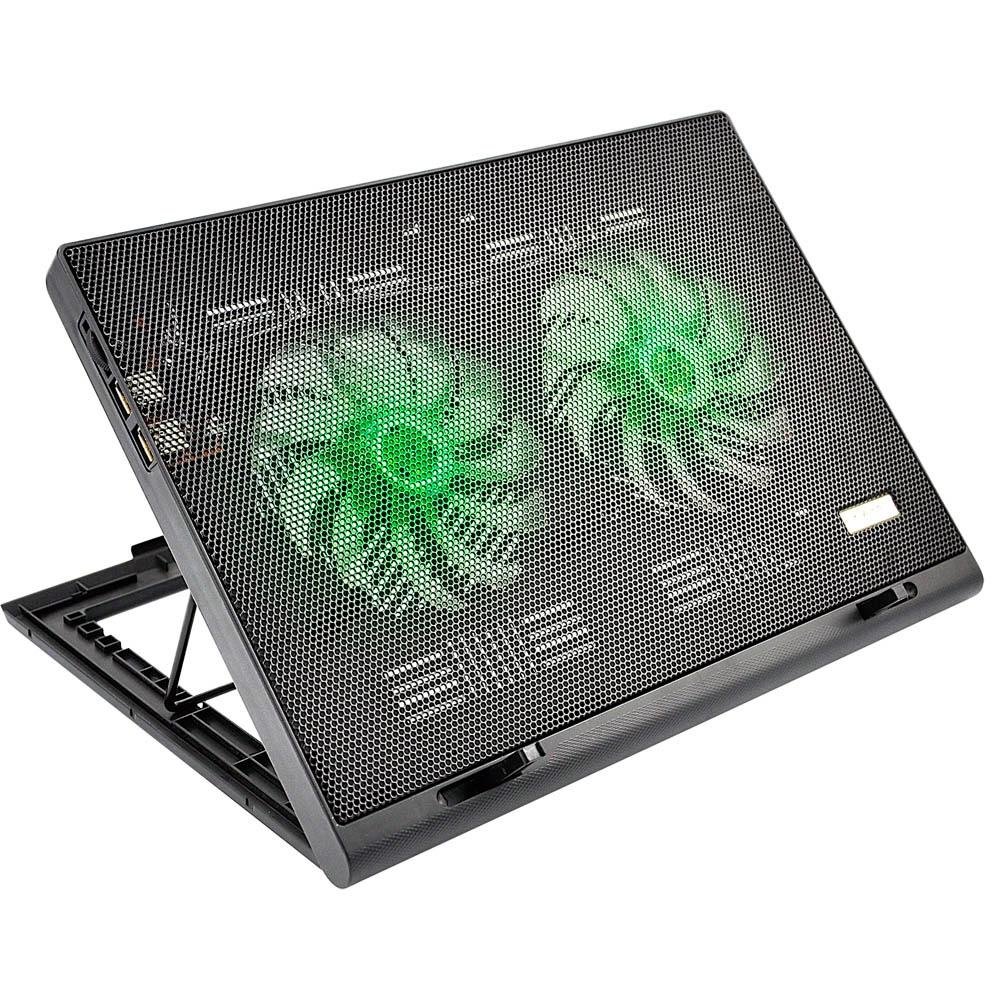
Also, if your laptop has no warranty seals, you can try opening it and cleaning it. No need to exactly disassemble the whole thing, just remove the dust from the air ducts and fans when you open the external cover.
-
SemlerPDX
- Posts: 530
- Joined: 2011-01-16 21:49
- Contact:
Re: 1.7.0.2 Stuttering on my game (Connection stutter)
This is a great suggestion for gaming on a laptop! Especially one running as hot as this! I had to rig up something similar when I was first getting into PR - was a lot more demanding on my then pre-2010 laptop, much more than BF1942: Desert Combat Mod had been. Couldn't even play the Arma 2 game I bought back then, but at least the laptop had a CD ROM drive so I could install it and test ... lolDeath! wrote:Yeah, this.
Try a fan base/table, Kato, they are not expensive:
Also, if your laptop has no warranty seals, you can try opening it and cleaning it. No need to exactly disassemble the whole thing, just remove the dust from the air ducts and fans when you open the external cover.
Whatever you can do to keep that laptop cool will keep it from dying early due to all this excessive heat. It's an early death for components, no doubt, if you keep up in this manner unchecked. Even having a simple small desk fan blowing across the keyboard would net some relief, or raising the laptop a few cm from the desk/table for a little extra airflow, or both. I'd bet that after gaming for just one map, the area under the laptop is very warm to the touch. Trapped heat will radiate back, some airflow would help negate that accumulation, at the very least.
-
Coalz101
- Posts: 493
- Joined: 2017-07-03 11:11
Re: 1.7.0.2 Stuttering on my game (Connection stutter)
Had stuttering recently and It was almost impossible to play...I decided to run a standing fan on my laptop just as a proof of concept. I wanted to know if this really was a heat probably or something else. Turns out with the fan running I was capable of getting a steady 60 fps on all games where and stuttered including PR...
Two days ago i decided to open my laptop and check the fan...Lord was I in for a treat, There was a big chunk of dust on the radiator vents (Fanvents/airducts whatever you call them) and it looked like a piece of soft foam that you'll find in vacuum cleaners... After cleaning that out I was capable of getting steady 60FPS on PR again with all the reshade presets I use to use in. PC ran like brand new!
TLDR; Clean your fans whenever you get a chance you won't believe how much dust can build up when running your computer almost 24/7
Two days ago i decided to open my laptop and check the fan...Lord was I in for a treat, There was a big chunk of dust on the radiator vents (Fanvents/airducts whatever you call them) and it looked like a piece of soft foam that you'll find in vacuum cleaners... After cleaning that out I was capable of getting steady 60FPS on PR again with all the reshade presets I use to use in. PC ran like brand new!
TLDR; Clean your fans whenever you get a chance you won't believe how much dust can build up when running your computer almost 24/7