[Help!] Texture Problem

Making or wanting help making your own asset? Check in here
Post Reply
[79th] Le_Chat
Posts: 2
Joined: 2007-06-25 10:44

[Help!] Texture Problem

Post by [79th] Le_Chat »

Hi guys,

Please allow me, to introduce myself ... well I'm a man of ... :p
(Rolling Stones Fan will understand :roll: ) :

I'm Le_Chat , member of the 79th, a French BF Team since early days of 1942.
We generally play the FH mod, and were eagerly awaiting the FH² Mod.
(We do not like BF2 ... too arcade)

But let's say that since we are getting a bit tired of waiting for FH², we've tried PR after a recommandation from a BF2 player ... and we love it.
So thanks first for your great work.

Personally, I'm the team trainer, mapper, modder and have made several maps on FH, and even a plane which I have given to the dev. team, and that might appear one day in FH² :roll:
Anyway, since we joint the PR community, I've started to look into mapping to produce a specific train map especially for helo and plane training.

Things were progressing nicely ... until I now have a bug, which I think is a texture bug.
I've been looking in the Tut, and search engin, both on your forum and on the BF-Editor forum but haven't found an explanation.

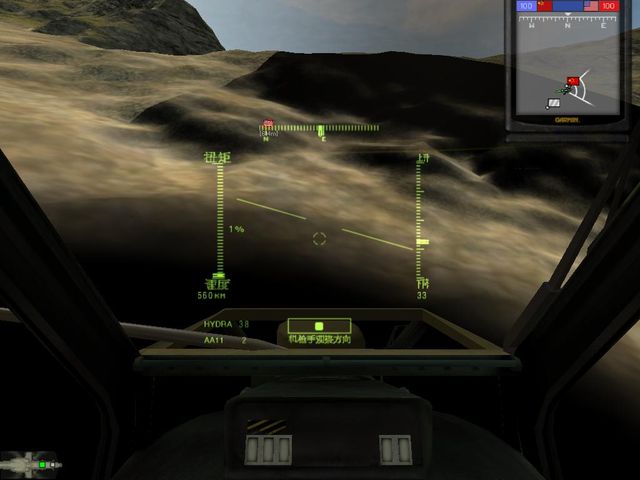
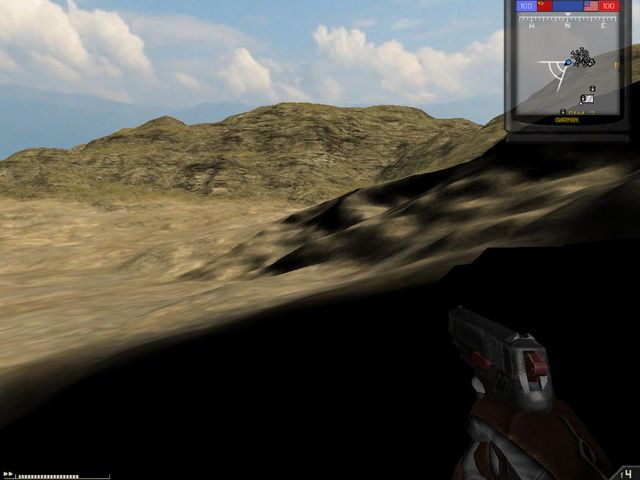
Here is what I get :
Image

Image

Both ingame and in the editor, I have a giant shadow casted under me (either while walking (pic1) or flying (pic2)), same thing in the editor when I get close to the ground.
My feeling is that it is the detailed texture missing (the one you see at short range), thus replaced by a black default texture ?

I still have an earlier version of the map, that is working.
So I'have been comparing the files one by one, but I cannot find which one has been damaged (in order to recopy it in the latest version).

Any suggestion where to look for ?

Thanks in advance for your help
Miaou ;)
Desertfox
Posts: 5886
Joined: 2006-08-15 06:41

Post by Desertfox »

Trying setting your low detail types. There should be a tutorial on the BFEditor forums.
Image
Rhino
Retired PR Developer
Posts: 47909
Joined: 2005-12-13 20:00

Post by Rhino »

set detail textures for every texture layer.
Image
[79th] Le_Chat
Posts: 2
Joined: 2007-06-25 10:44

Post by [79th] Le_Chat »

Thanks guys, it did not work ... but it still gave me some indications and since I've resolved my prob., I'll post here the solution for those that might one day have the same phenomenon.

In fact I had used an existing terrain on a map, and had modified it to installed my objects (creation of a sea, a shooting range, a lac aso aso).
After this modification, I started to have this "black close environment problem", indeed because the program was lost with detailed textures.
This was located in the "terrain.raw" file

Indeed, since the texture were not present in the "levels" (in terrain editing mode) impossible for me to regenerate the detailmaps.

I therefore used T-Paint and repainted the map.
This soft is absolutly clever (I'll have to drop a quick congratulation to the guy who did it) 8-)
Thnen I've been able to regenerate the texture assignement.

And yop everything is now fine.

Btw, I had also a small pb on minimap generation (I soved it via Toshop), but I'll still post a question on a specific thread , for next time ;)

Miaou :)
Post Reply

Return to “PR:BF2 Community Modding”