I found a fix for the "memory .dll error" for vista 32 & 64 bit users

Discussion on Computer Software & Operating Systems
R.J.Travis
Posts: 707
Joined: 2007-12-09 21:27

I found a fix for the "memory .dll error" for vista 32 & 64 bit users

Post by R.J.Travis »

I found a fix for the "memory .dll error" that kicks some of us out to desktop every 2 or 3 map loads on certain servers, some more than others but from what I have been reading this is a problem for a lot of people running Vista, myself included.

The problem is that the BF2.exe is trying to use more memory than it is allowed to, this fix enables the BF2.exe to use more than it's current limit of 2gb (physical and PF together) for the second or two it needs it during certain map loads.

Video Tutorial at the bottom of this post.


Color Coded Key.

Dark Red (Windows Vista 23bit & 64bit)

Dark Blue (Windows 7 RC 32bit & 64bit)

Sienna (Windows vista 32bit - 64bit & Windows 7 RC 32 - 64bit)

Black DOS guide and the thinks i forgot to color!

I Color Coded it to try and make it trad proof. ;)


Edited for Windows 7 RC 32bit - 64bit
& Windows Vista 32bit - 64bit

Here you go

(You'll need to be an Administrator)

Windows Vista 32bit - 64bit

First, you'll need to grab and install Visual Studio C++ Express from Microsoft.

It's free so don't worry. Downloads

(You'll need to be an Administrator)

Windows 7 RC 32bit - 64bit

Windows 7 RC user's follow the Vista 64-bit guide.

It's free so don't worry. Downloads

Once installed, you'll need to update it, also make sure u have latest game

patch installed.

Backup the bf2.exe file, just in case.

Windows Vista 32bit - 64bit


Now, click
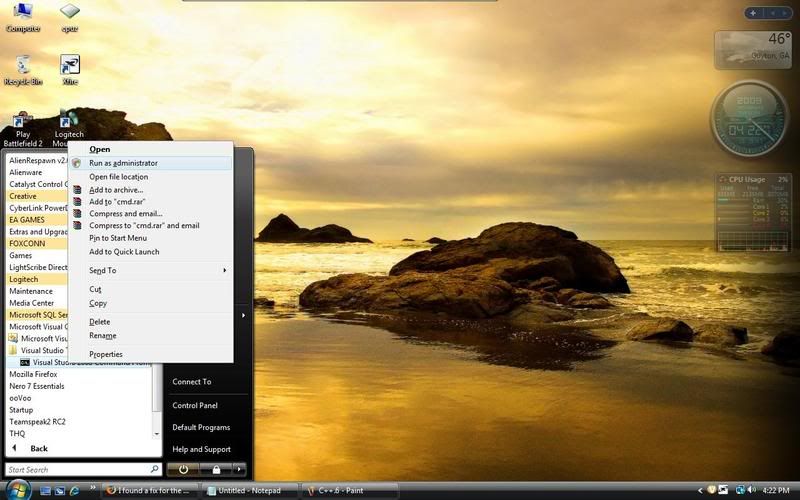
Start ->Visual C++ 2005 Express Edition ->Visual Studio Tools ->Visual Studio 2005 Command Prompt

Windows 7 RC 32bit - 64bit


Start->All Programs->Microsoft Visual Studio 2010->Visual Studio Tools->Visual Studio 2010 Command Prompt

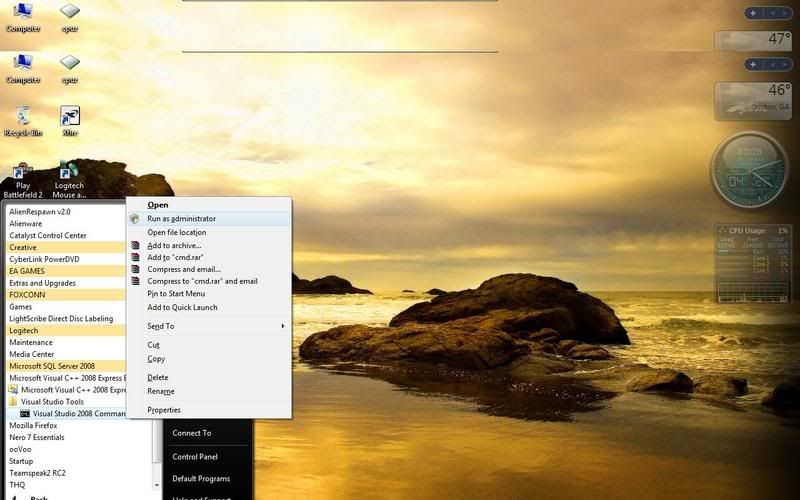
(Don't left click on VS 2005 command prompt though, right click on it and then click **"Run as Administrator"**)
Image

**If you don't run it as Administrator the fix will not work**

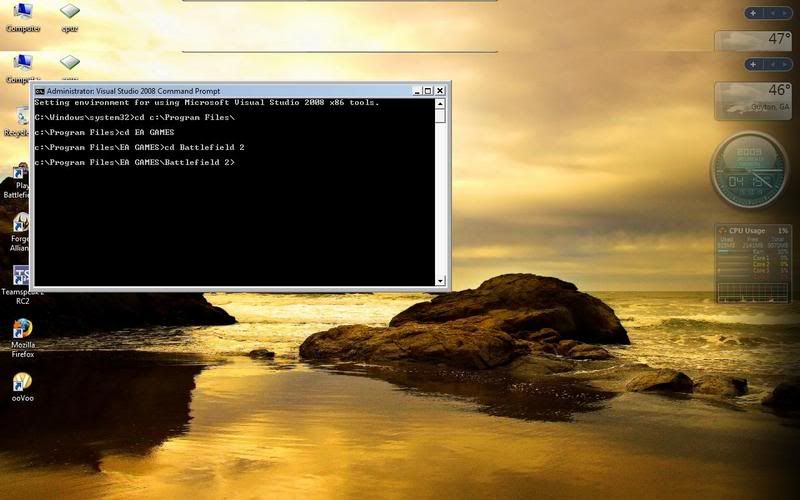
Then, once the black Command Prompt box is open, navigate to your battlefield 2 directory.

If you don't know how to navigate in DOS, follow this :d efault


In Windows Vista 32bit & Windows 7 RC 32bit cd c:\Program Files\ ENTER **or** In Windows Vista 64 & Windows 7 RC 64bit cd c:\Program Files (x86)\ ENTER
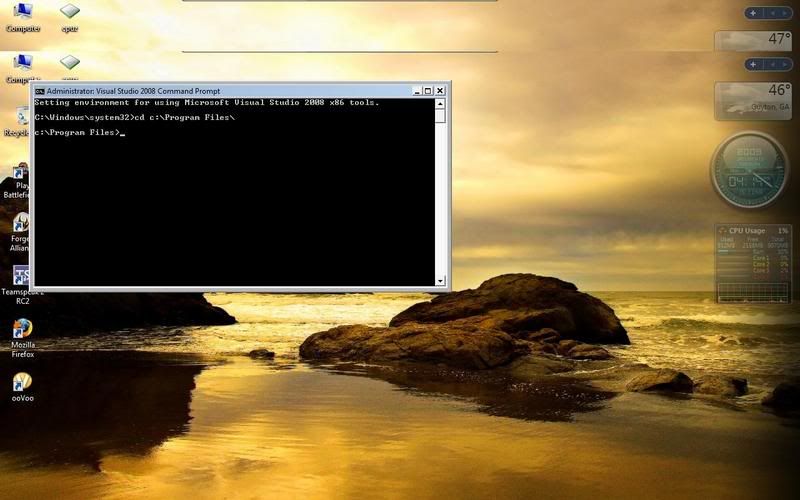
Image

then usually it's "cd EA GAMES" ENTER
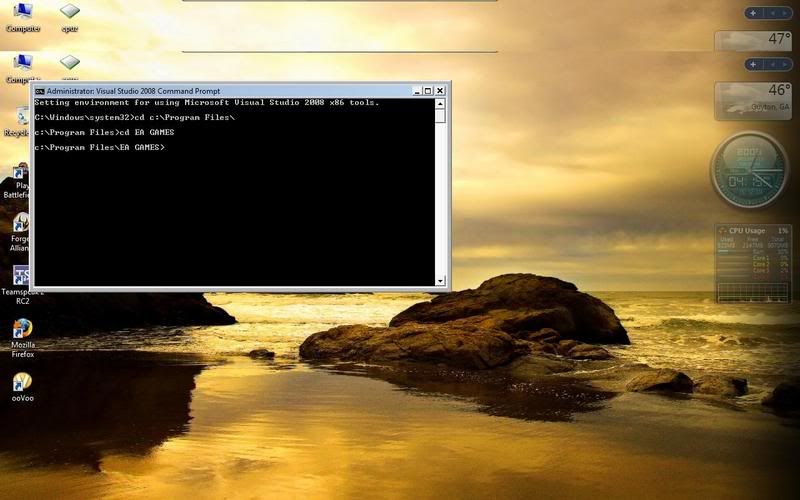
Image

then "cd Battlefield 2" ENTER

Image

NOW WRITE THIS

editbin.exe /LARGEADDRESSAWARE BF2.exe hit ENTER
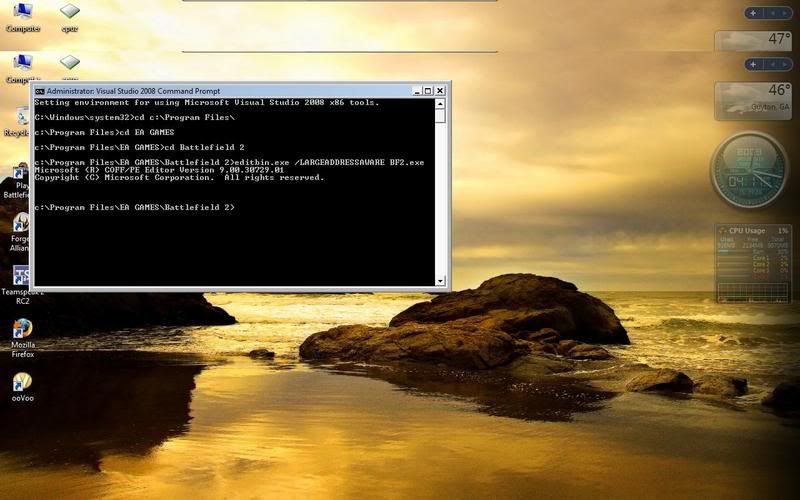
Image

It should then come up with a "Microsoft copyright or trademark" type thingy, this means it was successful.
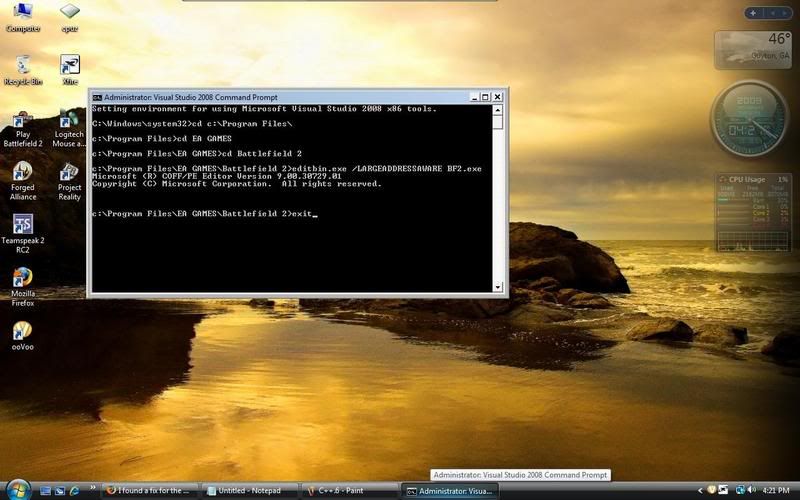
Image

Type "exit" and hit ENTER, and it's fixed! for vista 64-bit

64 bit Vista users can now restart and play, **32 bit Vista users follow the next step**

In a command prompt and once again **Run your command prompt **"As Administrator"**
Image

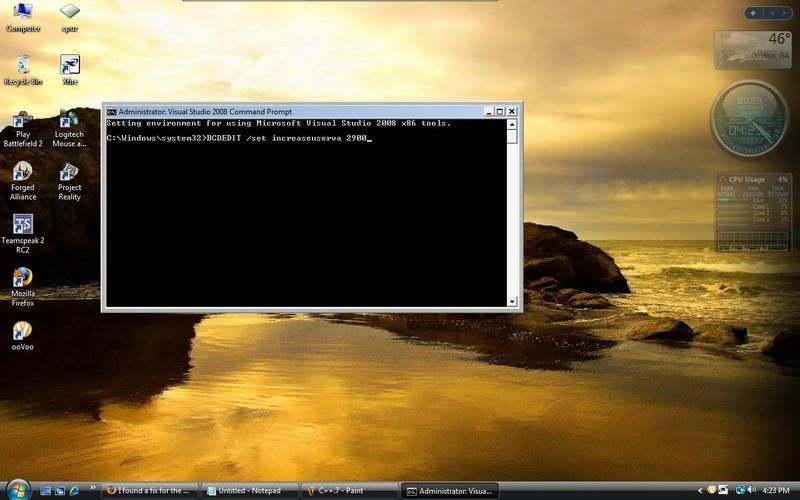
You should have this
Image

Type this command:
BCDEDIT /set increaseuserva 2900 ENTER

Image

Now exit out of that box, restart and you're done!

<object width="660" height="525"><param name="movie" value="http://www.youtube.com/v/gc-Em6SFJj4&hl ... ram><param name="allowFullScreen" value="true"></param><param name="allowscriptaccess" value="always"></param><embed src="http://www.youtube.com/v/gc-Em6SFJj4&hl ... 1&border=1" type="application/x-shockwave-flash" allowscriptaccess="always" allowfullscreen="true" width="660" height="525"></embed></object>[/youtube]


**THIS IS ONLY FOR "memory .dll error" AND ONLY THIS.

THIS WILL NOT HELP ANYTHING LESS AND PLEASE DON'T USE THIS FOR ANYTHING OTHER THEN THE POSTED ERROR**


This was done with Vista 32-bit in the photo's

I posted this before back around 0.6 but I did not have the Photo's to help and couldn't find it anywhere so I thought I'd retype it with Photo's help.

***Updated***

If you are using a ATI card on your computer, You will need to uninstall C++ and all its files to upgrade your drivers C++ will sometimes stop the driver install program from responding the fix will still say after you delete C++.
Last edited by R.J.Travis on 2009-05-29 14:21, edited 17 times in total.
Reason: Now works with windows 7 RC added video.
Twisted Helix: Yep you were the one tester that was of ultimate value.
pclipse_teh_owner
Posts: 440
Joined: 2008-01-20 15:07

Re: I found a fix for the "memory .dll error" for vista 32 & 64 bit user's only.

Post by pclipse_teh_owner »

2900 is kinda high imo.

Plus it's good to increase the number by 16 ;)

2560

The amounts should be dropped or increased by 64


However good tutorial. It'd be good to explain how this works. So I shall do so :P For Vista 32 atleast.


This change only tweaks the address space, relieving the OOM error. The 32bit system will use the physical memory installed up to 4GB regardless!

Basically you're only changing the amount of memory usage.
Image
Makee
Posts: 327
Joined: 2006-09-12 08:39

Re: I found a fix for the "memory .dll error" for vista 32 & 64 bit user's only.

Post by Makee »

Beautiful step by step explain Travis!

For me (Vista 64), that CTD memory issue, came with 0.8 and I've fixed it just like you & [R-DEV]Cheeseman described.

I don't have memory issues, CTD's and no PB problems because of that, at all.


Pity that this guide belongs in sticky section where its visibility will be drastically decreased.

Really don't know why is that so, but must admit that I've caught myself way more than once in skipping stickies.
R.J.Travis
Posts: 707
Joined: 2007-12-09 21:27

Re: I found a fix for the "memory .dll error" for vista 32 & 64 bit user's only.

Post by R.J.Travis »

Makee wrote:Beautiful step by step explain Travis!

For me (Vista 64), that CTD memory issue, came with 0.8 and I've fixed it just like you & [R-DEV]Cheeseman described.

I don't have memory issues, CTD's and no PB problems because of that, at all.


Pity that this guide belongs in sticky section where its visibility will be drastically decreased.

Really don't know why is that so, but must admit that I've caught myself way more than once in skipping stickies.
I just read chessman post and he totally quoting me from the first time i posted this info way back in 0.6 for his own sticky ):

But i PM him to let him know i updated it with step by step photos so he can update his sticky ;)

https://www.realitymod.com/forum/f27-pr ... +vista+bit
Twisted Helix: Yep you were the one tester that was of ultimate value.
Garack
Posts: 624
Joined: 2006-05-04 07:20

Re: I found a fix for the "memory .dll error" for vista 32 & 64 bit user's only.

Post by Garack »

Ok i will test this, cause i have the same problems with vist32. I have increased the maxed memory up to 3072 with BCDEDIT /set increaseuserva 3072 since Summer 2008 cause i want AOC to run with no CDT. But i havent allowd the bf2.exe to use it.

i try this now. when this doesnt work how to revert this?
monatu
Posts: 24
Joined: 2007-12-23 03:50

Re: I found a fix for the "memory .dll error" for vista 32 & 64 bit user's only.

Post by monatu »

by memory.dll error you mean crashing in between map changes or what?
Makee
Posts: 327
Joined: 2006-09-12 08:39

Re: I found a fix for the "memory .dll error" for vista 32 & 64 bit user's only.

Post by Makee »

Yeah, between map changes and also sometimes during play.

If you are not sure what's your problem, run PR in windowed mode (right click on shortcut...) and this will generate an error message when your problem happens.
theSASTA
Posts: 91
Joined: 2007-04-09 22:30

Re: I found a fix for the "memory .dll error" for vista 32 & 64 bit user's only.

Post by theSASTA »

I had this error from time to time... tried this "c++ *.exe hack" and never saw this error again :D

CHEERS 4 THAT
RedAlertSF
Posts: 877
Joined: 2008-10-07 14:21

Re: I found a fix for the "memory .dll error" for vista 32 & 64 bit user's only.

Post by RedAlertSF »

I did this thing and after that I get automatic CTD when starting the game. What happened?

I'm getting memory errors like all the time so this would be nice.

EDIT: Yeah restart helped alot, now I can run the game. Going to test later does this fix anything.

EDIT2: Doesn't help at all.
Last edited by RedAlertSF on 2009-01-27 18:12, edited 2 times in total.
LeChuckle
Posts: 664
Joined: 2007-02-09 13:53

Re: I found a fix for the "memory .dll error" for vista 32 & 64 bit user's only.

Post by LeChuckle »

yep, its like a cure. not a single CTD since i applied the fix
R.J.Travis
Posts: 707
Joined: 2007-12-09 21:27

Re: I found a fix for the "memory .dll error" for vista 32 & 64 bit user's only.

Post by R.J.Travis »

I'm glade I was of some help to yall.
Twisted Helix: Yep you were the one tester that was of ultimate value.
Slick
Posts: 23
Joined: 2008-09-03 03:49

Re: I found a fix for the "memory .dll error" for vista 32 & 64 bit user's only.

Post by Slick »

Did not get this to work, I get an error that the system could not find editbin.exe.

What am I doing wrong?
Arnoldio
Posts: 4210
Joined: 2008-07-22 15:04

Re: I found a fix for the "memory .dll error" for vista 32 & 64 bit user's only.

Post by Arnoldio »

Yeah, same for me as I sent PM to Travis, even he didn't figure it out so far.
Image


Orgies beat masturbation hands down. - Staker
Deadfast
Retired PR Developer
Posts: 4611
Joined: 2007-07-16 16:25

Re: I found a fix for the "memory .dll error" for vista 32 & 64 bit user's only.

Post by Deadfast »

No need for doing it yourself anymore ;)


You can download the fixed version from here:
https://www.realitymod.com/forum/f27-pr ... -85-a.html
R.J.Travis
Posts: 707
Joined: 2007-12-09 21:27

Re: I found a fix for the "memory .dll error" for vista 32 & 64 bit user's only.

Post by R.J.Travis »

well once again my idea has gone to a [R-DEV] );

but his program seems to do more then just change the memory.

Oh and I got no clue why you are getting this error please post a screen shot of the error and i can go from there.
Last edited by R.J.Travis on 2009-01-29 22:35, edited 1 time in total.
Twisted Helix: Yep you were the one tester that was of ultimate value.
Arnoldio
Posts: 4210
Joined: 2008-07-22 15:04

Re: I found a fix for the "memory .dll error" for vista 32 & 64 bit user's only.

Post by Arnoldio »

Travis said in PM you have to right click the button, go all the way up under "Open" and then click "Run as administrator" there not under properties...then it should work.
Image


Orgies beat masturbation hands down. - Staker
R.J.Travis
Posts: 707
Joined: 2007-12-09 21:27

Re: I found a fix for the "memory .dll error" for vista 32 & 64 bit user's only.

Post by R.J.Travis »

ChizNizzle

sent me a PM stating following the posted fix worked ^^^
Twisted Helix: Yep you were the one tester that was of ultimate value.
kurbutti
Posts: 9
Joined: 2008-04-01 14:08

Re: I found a fix for the "memory .dll error" for vista 32 & 64 bit user's only.

Post by kurbutti »

Slick wrote:Did not get this to work, I get an error that the system could not find editbin.exe.

What am I doing wrong?
You sure you installed the needed C++ software correctly and you're 100% positive that you're using the program's cmd.exe instead of the windows's own? The only reason I can imagine MVS 9.0 being needed would be to provide us the editbin.exe itself.
R.J.Travis
Posts: 707
Joined: 2007-12-09 21:27

Re: I found a fix for the "memory .dll error" for vista 32 & 64 bit user's only.

Post by R.J.Travis »

Slick wrote:Did not get this to work, I get an error that the system could not find editbin.exe.

What am I doing wrong?
are you right clicking on the Visual Studio 2008 Command Prompt and scrolling up to run as a admin? if your trying to turn on run as a admin in the Properties then you need to turn off your UAC and follow the photo posted
Twisted Helix: Yep you were the one tester that was of ultimate value.
Wild_Bill_007
Posts: 52
Joined: 2007-09-05 18:35

Re: I found a fix for the "memory .dll error" for vista 32 & 64 bit user's only.

Post by Wild_Bill_007 »

Your fix worked but now every time i have loaded the 2nd map i get mayor FPS lagg any fix on that ?
"All you need is good men" - Heinrich Lehmann-Willenbrock
Post Reply

Return to “Software”