[Help] problem with BF2 tools for 3dmax

Making or wanting help making your own asset? Check in here
Post Reply
martov
Posts: 238
Joined: 2008-10-07 19:18

[Help] problem with BF2 tools for 3dmax

Post by martov »

hi guys, when I try to import any mesh to 3dmax using the BF2 tools I get this error

Image

I am using max 9
Tonnie
Retired PR Developer
Posts: 2014
Joined: 2007-07-31 14:59

Re: problem with BF2 tools for 3dmax

Post by Tonnie »

are you trying to open the con file?

HangMan: BF2 Editor, it has very strict limitations memory wise, and crashes all the time. Its like a girl. Treat it with respect and take it slow and you'll get places. Rush and get ahead of yourself and it will turn around and punch you in the mouth
martov
Posts: 238
Joined: 2008-10-07 19:18

Re: problem with BF2 tools for 3dmax

Post by martov »

I tryed to open the following files

"eu_heavy_soldier.skinnedmesh" (and all the soldiers of all the factions, light and hevy)
"at_mine.bundledmesh"
"ars_d30.bundledmesh"
"m249saw_ammo.bundledmesh"
I cant open any mesh because I get that error.


I am using this tool
Image
martov
Posts: 238
Joined: 2008-10-07 19:18

Re: problem with BF2 tools for 3dmax

Post by martov »

bump!

now I have a similar problem but when trying to export a model

Image

anyone?
Tonnie
Retired PR Developer
Posts: 2014
Joined: 2007-07-31 14:59

Re: problem with BF2 tools for 3dmax

Post by Tonnie »

ok try instead of importing by using necessary tools but use the BF2 Utilities and go mesh importer from there just find the con file for the object you want to import

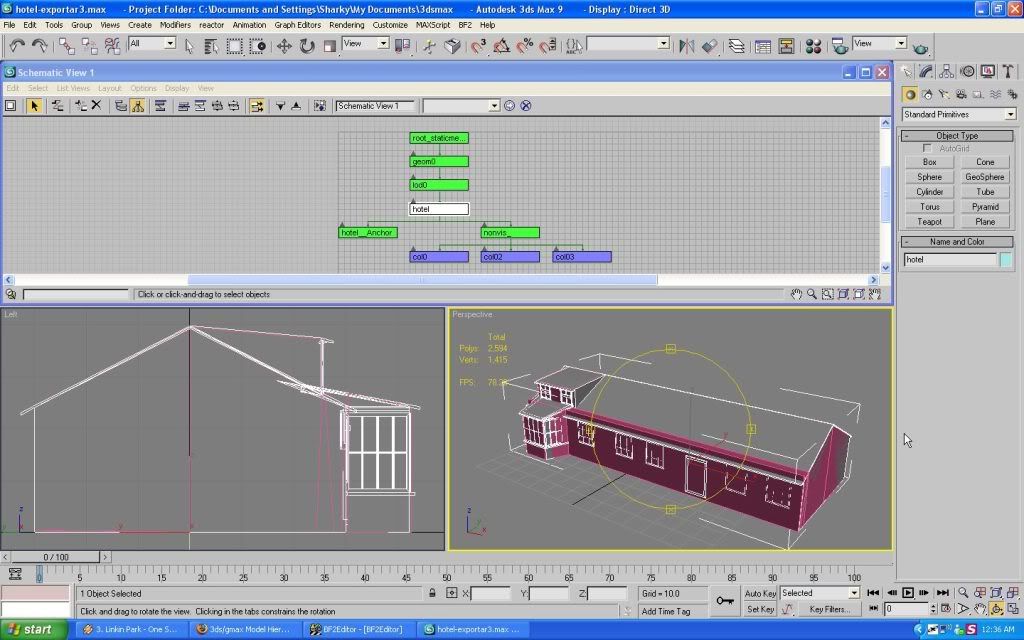
As for the exporting... have you got the hierarchy set up correct? try posting a screenshot of the hierarchy for me.

HangMan: BF2 Editor, it has very strict limitations memory wise, and crashes all the time. Its like a girl. Treat it with respect and take it slow and you'll get places. Rush and get ahead of yourself and it will turn around and punch you in the mouth
martov
Posts: 238
Joined: 2008-10-07 19:18

Re: problem with BF2 tools for 3dmax

Post by martov »

Image
Image
Image

there you are, I did not find the exporting tool in the utilities

here is a link to my model (I was going to give it to public domine anyways) I would apreciate if you try to export it, that would help me to know if this problem is all about the model or the 3dmax plugin.

RapidShare: Easy Filehosting
Tonnie
Retired PR Developer
Posts: 2014
Joined: 2007-07-31 14:59

Re: problem with BF2 tools for 3dmax

Post by Tonnie »

1. hierarchy was complety screwed see pics for more detail

This is your current hierarchy:
http://i160.photobucket.com/albums/t187/tonnie15/ScreenshotStudiocapture6.jpg

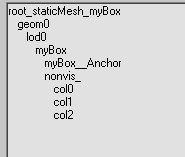
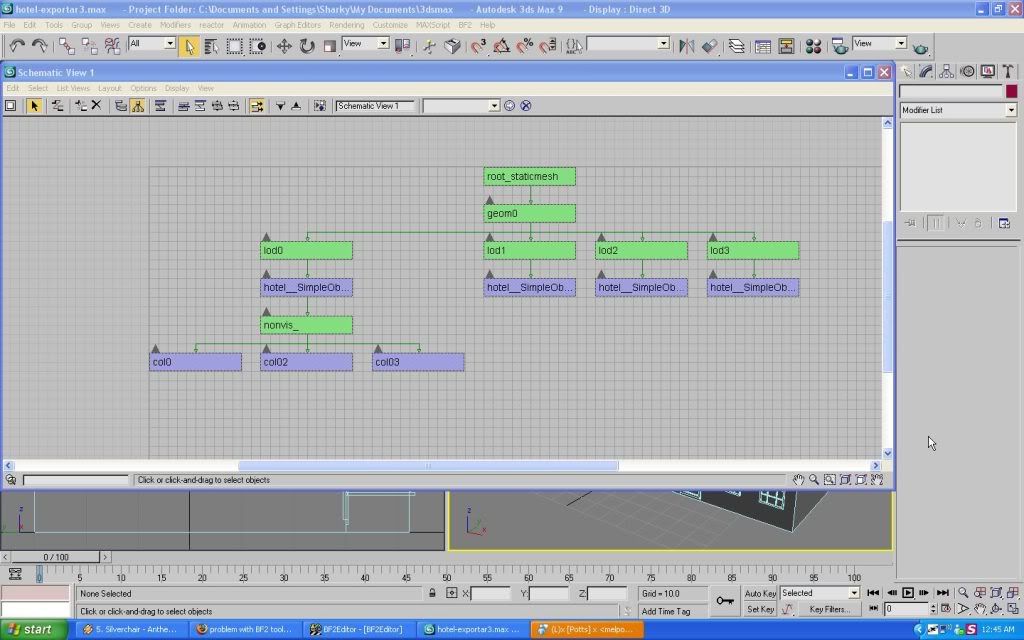
When it should look like this:
http://i160.photobucket.com/albums/t187/tonnie15/ScreenshotStudiocapture7.jpg


2. You had the file looking for this texture "E:\Documents and Settings\joaco\Escritorio\Imagen1.tif"
----a. That first off needs tobe a dds texture file and...
----b. you should have a folder already made where you plan to export and have a "textures" folder inside that and put your textures inside that one.
----c. Then with the texture path inside max you need to make it the same as the texture folder you just made but then you need to delete every thing before the "objects/bla bla bla" so for example

(This is for a model i exported)
Path as it is on my computer
"C:\Program Files\EA GAMES\Battlefield 2\mods\pr_edit\objects\Weapons\Handheld\frekni_baionnette\texture s\frekni_baionnette_c.dds"

now what max needs to read is:
"objects\Weapons\Handheld\frekni_baionnette\texture s\frekni_baionnette_c.dds"

3. You had the object named wrong. dont name an object just "hotel" it would be named "hotel__SimpleObject"

I would also strongly suggest checking this out for proper hierarchies for bf2 exporting.

theres alot to get your head around exporting but once you get it it becomes second nature ;)

-tonnie


theres more too it and i will post it once i get time

HangMan: BF2 Editor, it has very strict limitations memory wise, and crashes all the time. Its like a girl. Treat it with respect and take it slow and you'll get places. Rush and get ahead of yourself and it will turn around and punch you in the mouth
martov
Posts: 238
Joined: 2008-10-07 19:18

Re: problem with BF2 tools for 3dmax

Post by martov »

thanks! :)

I was trying to export it using this tutorial
https://www.realitymod.com/forum/f189-m ... -gmax.html
I dont get why the hiterachy on the tutorial is like this and it is supposed to work :S

Image

I will try to do it with the hiterachy you posted

EDIT:
mmm nice, this will help
http://bfeditor.org/forums/index.php?showtopic=5013
Last edited by martov on 2009-07-02 20:20, edited 4 times in total.
martov
Posts: 238
Joined: 2008-10-07 19:18

Re: problem with BF2 tools for 3dmax

Post by martov »

ok, I got everithing you said fixed :)

hierarchies and objects name's fixed

Image
texture path (for max)
objects\staticobjects\hotel\textures\a.dds

Image
texture format comverted to .DDS

I still have the same error unfortunately :(
martov
Posts: 238
Joined: 2008-10-07 19:18

Re: problem with BF2 tools for 3dmax

Post by martov »

[SOLVED]

I was using dated BF max tools, and apparently this outdated tools where incompatible with max 9 or something. I downloaded more recent tools (poe tools) and they exported my static

thank you anyways, you have helped me a lot. :D
Post Reply

Return to “PR:BF2 Community Modding”