
I've just installed the latest PR Mumble (0.5 beta) and it's crashing every time I try to join a server. This happens whether I skip the wizard or not, or whether I bind the squad leader shortcut key or not. The first time I attempt to join a server after install it will ask me to accept the security certificate, and once I do, it crashes. Every time thereafter it will crash when I try to join a server. I also tried it on multiple servers besides the PR server and I get the same result.
I've reinstalled multiple times, and made sure that the settings were deleted out of the Application Data folder after each uninstall as well.
This is pretty crappy considering this is the only version of Mumble that's "allowed" to join the PR server, and now I'm being threatened to be kicked in some servers if I don't join Mumble. So hopefully someone can rectify this issue.
This shouldn't be the only version allowed to join the server though, considering it IS a beta after all, so problems are expected and will arise, and not just for myself. If I'm being booted out of servers for not being on Mumble, through no fault of my own, then that will really be a crappy situation.
Here are some other threads of people having the same issue I am, but I didn't find a solution or a thread dedicated to this very issue (at least not on these forums):
SourceForge.net: Mumble: Help
https://www.realitymod.com/forum/f27-pr-support/59970-mumble-crashing-when-setting-squad-leader-shortcut.html
https://www.realitymod.com/forum/f360-technical-support/59527-mumble-issue.html
The second thread started off about the squad leader shortcut issue, but a couple other people posted with the same problem as this.
PR Mumble 0.5 beta
Windows XP (32-bit)
Pentium D 920 (3.0 GHz)
4 GB RAM
Nvidia 8800 GTX
No firewalls installed
No other versions of Mumble installed
Mumble Crashes When Joining Server
-
OUT FOX EM
- Posts: 36
- Joined: 2009-03-28 01:35
-SOLUTION- Mumble Crashes When Joining Server
Last edited by OUT FOX EM on 2009-07-12 18:41, edited 1 time in total.
Reason: Solution found
Reason: Solution found
-
DanishPride
- Posts: 174
- Joined: 2009-03-21 21:04
Re: Mumble Crashes When Joining Server
ah yh i had the same problem once. I was just told to turn off the overlook so you can't see ingame who is on the mumble
In-Game: Makemebad[DK]

-
Mr.Hyde
- Posts: 196
- Joined: 2009-06-17 17:04
Re: Mumble Crashes When Joining Server
Can you take a screenshot of your processes for me?
"Any society that would give up a little liberty for security deserve neither and will lose both" ~Benjamin Franklin
-
space
- Posts: 2337
- Joined: 2008-03-02 06:42
Re: Mumble Crashes When Joining Server
Yep it sounds like you're using the overlay - just turn if off in the settings. There is only one server afaik that occasionally kicks people for non-mumble use, so if you continue to have problems, then you should easily find another server.
Another problem that many people seem to be having with 0.5, is that they can still hear the whole battlefield. Some people say that this can be fixed by running Mumble as adminstrator ( if using vista ) and also by making sure that the correct soundcard is selected in the drop down.
As always - turning your computer off, and then back on again often fixes it too.
Another problem that many people seem to be having with 0.5, is that they can still hear the whole battlefield. Some people say that this can be fixed by running Mumble as adminstrator ( if using vista ) and also by making sure that the correct soundcard is selected in the drop down.
As always - turning your computer off, and then back on again often fixes it too.
 [/URL]
-
OUT FOX EM
- Posts: 36
- Joined: 2009-03-28 01:35
Re: Mumble Crashes When Joining Server
Well I know it's not the overlay. By default the overlay has never been on. I tried enabling it and then it crashed, then I disabled it, and of course it crashed again. I'm not on Vista so there's no Administrator issues, and I've selected the proper soundcard in the drop-down box.
I'm going to post a screen shot of my processes in a minute. First I will try it in Safe Mode, so that way all processes are essentially disabled except the ones required by Windows.
I'm going to post a screen shot of my processes in a minute. First I will try it in Safe Mode, so that way all processes are essentially disabled except the ones required by Windows.
Last edited by OUT FOX EM on 2009-07-08 12:21, edited 2 times in total.
-
OUT FOX EM
- Posts: 36
- Joined: 2009-03-28 01:35
Re: Mumble Crashes When Joining Server
Well it let me connect in Safe Mode so apparently something is conflicting. Here's a screenshot of my processes:

Hopefully someone can spot something that's causing this. I've disabled every single item on the Startup tab in msconfig and also all non-Microsoft services on the Services tab as well -- no dice.
Hopefully someone can spot something that's causing this. I've disabled every single item on the Startup tab in msconfig and also all non-Microsoft services on the Services tab as well -- no dice.
-
Mr.Hyde
- Posts: 196
- Joined: 2009-06-17 17:04
Re: Mumble Crashes When Joining Server
I'm assuming you mean this message?OUT FOX EM wrote:...The first time I attempt to join a server after install it will ask me to accept the security certificate, and once I do, it crashes.
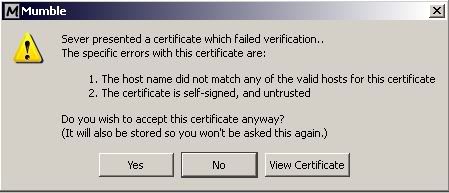
I'm also going to assume you click yes and then mumble crashes?
Possibly a certificate setting in XP...?
Try to install the regular mumble 1.1.8(?) and see if you can get on a server with that.
It works in safe mode.....but not in normal mode...hmmm. I'll have to think about this.
Last edited by Mr.Hyde on 2009-07-08 13:22, edited 2 times in total.
"Any society that would give up a little liberty for security deserve neither and will lose both" ~Benjamin Franklin
-
OUT FOX EM
- Posts: 36
- Joined: 2009-03-28 01:35
Re: Mumble Crashes When Joining Server
Yes, after I click Yes it will crash. Then when I attempt to join a server every time after that it will skip the certificate prompt and go straight to the crash.Mr.Hyde wrote:I'm assuming you mean this message?
I'm also going to assume you click yes and then mumble crashes?
Possibly a certificate setting in XP...?
Try to install the regular mumble 1.1.8(?) and see if you can get on a server with that.
It works in safe mode.....but not in normal mode...hmmm. I'll have to think about this.
I will try the original mumble and report back.
-
OUT FOX EM
- Posts: 36
- Joined: 2009-03-28 01:35
Re: Mumble Crashes When Joining Server
Ok so I tried it on regular Mumble 1.1.8 and it's doing the same thing.
-
Mr.Hyde
- Posts: 196
- Joined: 2009-06-17 17:04
Re: Mumble Crashes When Joining Server
Just so I have a clear understanding of the problem:
Either version of Mumble crashes
Installs correctly
Can meddle with settings without a problem
Every time you try to join a server the program crashes(Does explorer temporarily crash too?)
Allowing only necessary processes to run-Does not solve problem
Starting Mumble in Safe Mode-Functional
Is this a fair assesment?
....thinking.....
EDIT: Udate sound card drivers if you haven't already. If you do update drivers, re-install PRmumble.
Either version of Mumble crashes
Installs correctly
Can meddle with settings without a problem
Every time you try to join a server the program crashes(Does explorer temporarily crash too?)
Allowing only necessary processes to run-Does not solve problem
Starting Mumble in Safe Mode-Functional
Is this a fair assesment?
....thinking.....
EDIT: Udate sound card drivers if you haven't already. If you do update drivers, re-install PRmumble.
Last edited by Mr.Hyde on 2009-07-08 18:55, edited 1 time in total.
"Any society that would give up a little liberty for security deserve neither and will lose both" ~Benjamin Franklin
-
Mr.Hyde
- Posts: 196
- Joined: 2009-06-17 17:04
Re: Mumble Crashes When Joining Server
Thought this might help. I've noticed a lot of people are having this problem since 1.1.8/0.5 came out.[R-DEV]Twisted Helix wrote:That will have been 1.1.7 I think ... cant remember for sure but I think 1.1.8 was march release ?
Ok ... to help you clear your problem up , I think it might be to do with traces of one database or registry entry being left around. If you uninstall ALL mumble stuff and you do the following steps ...
1. Look in your program files folder or wherever you install stuff too and see if there is a directory named \Mumble or \Mumble(PR Edition), if there is ... look inside, tell me what the contents are and then delete them.
2. Look in your (or equivalent) Documents and Settings/$user/ApplicationData/ ... and look for any folder called Mumble or Mumble(PR Edition) , same thing ... tell me whats inside and delete it.
(and here $user means AllUsers or DefaultUser or PresentUser ... look in all of them)
3. Look in your registry for any mumble entries ... although this hopefully shouldn't be a problem. Look in both (the equivalent of) HKEY_CURRENT_USER and HKEY_LOCAL_MACHINE , for any folders named Mumble or Mumble(PR Edition) .... delete them.
Now install PR mumble.
Have you tried opening the default UDP port?
EDIT: Again. Make sure you look for the most updated sound card drivers and re-install PRmumble after update, if needed.
Last edited by Mr.Hyde on 2009-07-08 19:33, edited 2 times in total.
"Any society that would give up a little liberty for security deserve neither and will lose both" ~Benjamin Franklin
-
OUT FOX EM
- Posts: 36
- Joined: 2009-03-28 01:35
Re: Mumble Crashes When Joining Server
Yes, that's exactly what's happening so far (and no explorer does not crash). Thanks for helping me with this, we'll figure it out eventually I'm sure.Mr.Hyde wrote:Just so I have a clear understanding of the problem:
Either version of Mumble crashes
Installs correctly
Can meddle with settings without a problem
Every time you try to join a server the program crashes(Does explorer temporarily crash too?)
Allowing only necessary processes to run-Does not solve problem
Starting Mumble in Safe Mode-Functional
Is this a fair assesment?
....thinking.....
EDIT: Udate sound card drivers if you haven't already. If you do update drivers, re-install PRmumble.
I've checked my sound card drivers and I have the most up-to-date package installed, though I think if it was an issue with my drivers or the port I wouldn't connect in Safe Mode either.
I guess what I'll have to start doing is narrowing down what processes start in regular mode vs. Safe Mode, though I don't suspect a whole lot will be different since I have everything disabled.
I'll uninstall and then look for those registry keys and see if that clears anything up.
-
Twisted Helix
- Retired PR Developer
- Posts: 5145
- Joined: 2008-11-03 04:18
Re: Mumble Crashes When Joining Server
Yes it will happen with the original mumble as well. What is happening here is your computer is not accepting the exchange of SSL certificates. Basically the first time you join a server their is an exchange of an encryption key and this is used to encrypt the audio stream (which you can't turn off , its built into the code).OUT FOX EM wrote:Yes, after I click Yes it will crash. Then when I attempt to join a server every time after that it will skip the certificate prompt and go straight to the crash.
I will try the original mumble and report back.
However the certificate is generated on the fly by mumble and therefore it isn't signed by a third party. What it seems like is that there is something on your machine, when it isn't in safe mode, that is blocking third party unverified certificates.
My best guess would be a windows or firewall setting ... but its just a guess.
Yes correct to both those answers. Another reason is because people start mumble in game, and the plug in doesn't link up properly.Space wrote:Another problem that many people seem to be having with 0.5, is that they can still hear the whole battlefield. Some people say that this can be fixed by running Mumble as adminstrator ( if using vista ) and also by making sure that the correct soundcard is selected in the drop down.
-
OUT FOX EM
- Posts: 36
- Joined: 2009-03-28 01:35
Re: Mumble Crashes When Joining Server
Thanks for the response. Unfortunately I don't know where to go from here, since I don't use any kind of firewall or anti-virus software. As for it being a Windows setting, that'd be awful hard to hunt down. I guess I'm just SOL on using Mumble then until the next release. 1.1.7 works fine, so with any luck 1.1.9 will work again.[R-DEV]Twisted Helix wrote:Yes it will happen with the original mumble as well. What is happening here is your computer is not accepting the exchange of SSL certificates. Basically the first time you join a server their is an exchange of an encryption key and this is used to encrypt the audio stream (which you can't turn off , its built into the code).
However the certificate is generated on the fly by mumble and therefore it isn't signed by a third party. What it seems like is that there is something on your machine, when it isn't in safe mode, that is blocking third party unverified certificates.
My best guess would be a windows or firewall setting ... but its just a guess.
-
Twisted Helix
- Retired PR Developer
- Posts: 5145
- Joined: 2008-11-03 04:18
Re: Mumble Crashes When Joining Server
Umm you might want to ... I believe tests show that an unprotected PC connected to the internet can be infected within 1 minute.OUT FOX EM wrote: Unfortunately I don't know where to go from here, since I don't use any kind of firewall or anti-virus software.
I doubt it. Firstly 1.2 is the next release, and the encryption of the audio stream won't be going away from what I have seen of the code.As for it being a Windows setting, that'd be awful hard to hunt down. I guess I'm just SOL on using Mumble then until the next release. 1.1.7 works fine, so with any luck 1.1.9 will work again.
-
OUT FOX EM
- Posts: 36
- Joined: 2009-03-28 01:35
Re: Mumble Crashes When Joining Server
Well I found out what was causing the issue. It took awhile to hunt down but I found out the QWAVE (Quality Windows Audio Video Experience) service was the culprit. I disabled that and I'm good to go. I don't know what repercussions will come about from disabling the service, but all videos, games, music sound fine, and plus now I can join Mumble again.
So if you (Helix) want to pass the fix on to the Mumble developers then maybe they can figure out how to get around the problem, or at the very least communicate with the people on their forums having issues. I don't know if enough people are having this issue for it to be a sticky or not, but it probably wouldn't hurt.
Thanks for all the responses, and thanks to Mr. Hyde for pushing me in the direction of searching for the service causing it.
So if you (Helix) want to pass the fix on to the Mumble developers then maybe they can figure out how to get around the problem, or at the very least communicate with the people on their forums having issues. I don't know if enough people are having this issue for it to be a sticky or not, but it probably wouldn't hurt.
Thanks for all the responses, and thanks to Mr. Hyde for pushing me in the direction of searching for the service causing it.
Yeah but I've personally found them to be more trouble than they're worth. Having been an IT guy for awhile now I see AV and firewall software cause more problems than they solve. Maybe that's not the case for the average user, but for someone like me I'd rather run a hardware firewall and be done with it. I've been doing that for years and haven't had any viruses or hackers yet (knock on wood!).[R-DEV]Twisted Helix wrote:Umm you might want to ... I believe tests show that an unprotected PC connected to the internet can be infected within 1 minute.
-
OUT FOX EM
- Posts: 36
- Joined: 2009-03-28 01:35
Re: Mumble Crashes When Joining Server
I guess I should post step-by-step instructions on how to disable the service instead of assuming that everyone knows how to.
1. Click Start > Run > type 'msconfig' (without quotes) > press Enter or click OK.
2. Click on the Services Tab at the top.
3. Scroll down to the QWAVE service and uncheck the box. Click OK.
4. Reboot.
Now you should be good to go from here on out, as that service will be disabled permanently (unless another program turns it back on).
1. Click Start > Run > type 'msconfig' (without quotes) > press Enter or click OK.
2. Click on the Services Tab at the top.
3. Scroll down to the QWAVE service and uncheck the box. Click OK.
4. Reboot.
Now you should be good to go from here on out, as that service will be disabled permanently (unless another program turns it back on).
-
Twisted Helix
- Retired PR Developer
- Posts: 5145
- Joined: 2008-11-03 04:18
Re: Mumble Crashes When Joining Server
Its rather strange that you have qWave running as a service on Xp32 bit. Considering its a Vista service. Do you have some HD enabled video card or something ? Thats the only reason you should have something like that running on XP.
The driver for qWave fails to load if you are on XP normally (it does for me with the debug version readout). But the code falls harmlessly through.
The driver for qWave fails to load if you are on XP normally (it does for me with the debug version readout). But the code falls harmlessly through.
-
OUT FOX EM
- Posts: 36
- Joined: 2009-03-28 01:35
Re: Mumble Crashes When Joining Server
I don't know why it's on there either, but it is. I noticed a couple other people that have the same issue I do also have XP Media Center Edition, as I do. So whether it was installed by some other software package, or was packed in with XP MCE itself, I can't be too sure. I just know it was causing the crashes and disabling it fixes it. I guess it should be pretty harmless to disable it then, if it's exclusive to Vista (supposedly, anyway).[R-DEV]Twisted Helix wrote:Its rather strange that you have qWave running as a service on Xp32 bit. Considering its a Vista service. Do you have some HD enabled video card or something ? Thats the only reason you should have something like that running on XP.
The driver for qWave fails to load if you are on XP normally (it does for me with the debug version readout). But the code falls harmlessly through.
-
Mr.Hyde
- Posts: 196
- Joined: 2009-06-17 17:04
Re: Mumble Crashes When Joining Server
Finding a solution is always fun 
"Any society that would give up a little liberty for security deserve neither and will lose both" ~Benjamin Franklin