Joystick Profile Configuration

Post Reply
McBumLuv
Posts: 3563
Joined: 2008-08-31 02:48

Joystick Profile Configuration

Post by McBumLuv »

This os a thread for all joystick users to post some profiles/configs that they found useful to help other pilots of the sky have an easier time managing.

Make requests, comments, or guides.

When showing off configurations or neat features, be sure to include screenshots with which to better help out players, as well as what every step does and what it's useful for.

Oh, and remember to include what Joystick / mapping software you're using, obviously.


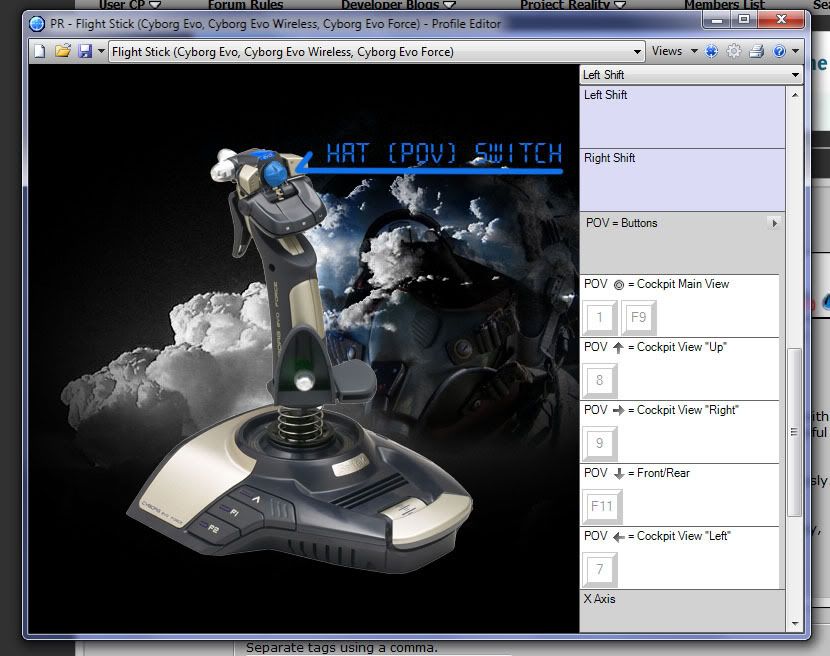
I'll start off with a personal favourite. When flying in PR, situational awareness is key, so I like to be able to quickly switch between all the views and back again as quickly as possible. I`ve therefore configured my HAT switch on my Saitek Evo Force in the SST to their coresponding views, including the look back. But what`s so great about this is that when the HAT switch is in the default position it will revert back to your primary view.

Be sure to only do this if it is a shifted command. If your HAT takes you back to your primary weapon whenever unshifted AND untouched, you won`t be able to access any of your other weapons.

Image
Image

Image

Image
Spearhead
Retired PR Developer
Posts: 1785
Joined: 2007-06-01 00:53

Re: Joystick Profile Configuration

Post by Spearhead »

I'm using a similar setup for my Stick.

Image
Hat1 (The gray one) is used for views. I didn't make it snap back to forward on centering the hat. I prefer for it to stay in the view left & right so that I can use the alt-fire method of shifting them up if I want to. Moving the hat up sends me back forward and holding it up for about a second lets me view up front by 45°. Pulling on hat 1 lets me look back until i let it return back into the center.

The other hats serve for communication mostly (Macros for the Q & T commo roses). Things like get in & bail out, roger & negative and "on the way". One hat controls the map and another trims the throttle for fine tuning. Oh and of course the hat2 (below big red button) selects weapon slots 2-5.

The most recent addition is a commo channel selector on the throttle. I have a button on the right side of the stick that I use to transmit on the radio. The new throttle program allows me to set this to transmit on any one of those channels: Squad, Command, Mumble local & Mumble squad leader.

If anyone here is using the same stick and is interested in the code I wrote just send me a PM. At the current settings I don't have any real need to use the keyboard while in the air (other than typing chat if the other guys are not on any voip channel).
Image
Tim270
PR:BF2 Developer
Posts: 5166
Joined: 2009-02-28 20:05

Re: Joystick Profile Configuration

Post by Tim270 »

What program is that Mcluv? I have the same stick but ive never seen that.
Image
LUKE_NUKE_EM
Posts: 417
Joined: 2009-06-12 19:41

Re: Joystick Profile Configuration

Post by LUKE_NUKE_EM »

Tim270 wrote:What program is that Mcluv? I have the same stick but ive never seen that.
Thats the Saitek SST profiler, look it up on their website.

http://www.saitek.com/uk/down/drivers.htm


I use that for my Saitek x52, if anyone else has one let me know.

Image
Last edited by LUKE_NUKE_EM on 2010-02-21 00:19, edited 1 time in total.
Image
Post Reply

Return to “Aircraft Tactics”