Here you go dude, I had 15 mins free so knocked up an example. Theres loads of different ways of UV mapping, I aint no expert and i like to cheat where possible!
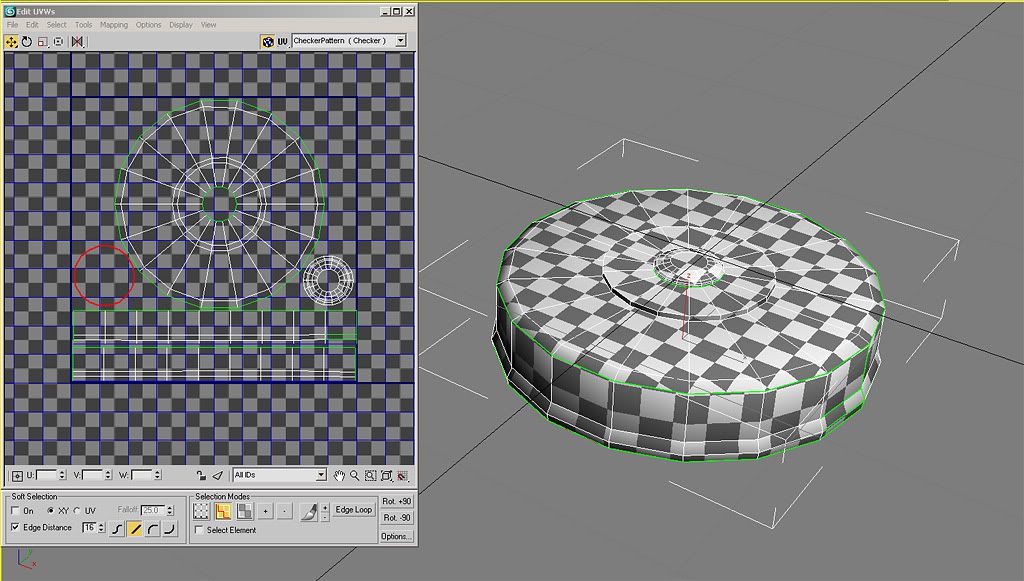
So the small circle on the bottom left is the underneath, the resize is probably a bit extreme but its rarely seen so who cares, and the circle on the bottom right is the screw in fuse that is on top of the mine. I put it down there as I could make it a bit bigger than it is inside the circle, and I had some spare space. The squares down the bottom are the cylindrical unwrap of the large cylinder sides. I chopped them in two half way along so they fit in the texture space better. I could have laid them on top of each other if I was really short on space, but I think as its done is ok.
I hate having disconnected edges cos they are a pain to texture corners. Here you can see ive cheated on the very small cylinder edges, for example the screw in bit on the top ive just planar mapped from the top then shrunk the top polys which then reveal the side polys. You dont get a perfect map this way but on very small edges you're not going to notice and this saves a lot of time. On the large corner I have had to separate the sides and cylindrical map them. If I was doing this properly I would probably keep the bevel with the cylindrically mapped piece so i could still texture the corner seamlessly and not have a seam right on a corner..... but i rushed it!




