[Help] UV-wrapping

Making or wanting help making your own asset? Check in here
Post Reply
boilerrat
Posts: 1482
Joined: 2009-09-02 07:47

[Help] UV-wrapping

Post by boilerrat »

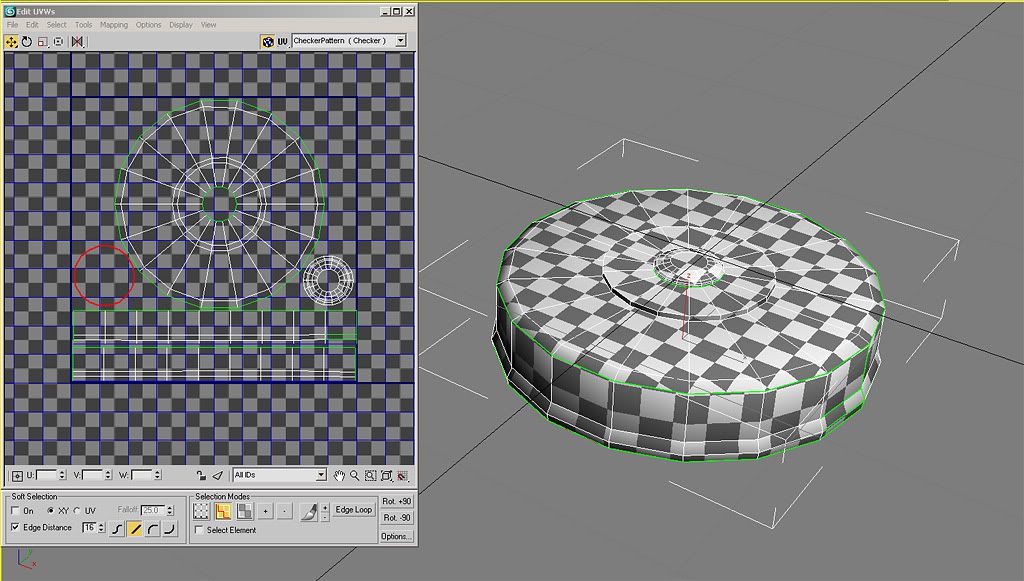
I have my whole model separated in the unwrap edit menu.

What next?

Image
Amok@ndy
Retired PR Developer
Posts: 5144
Joined: 2008-11-27 22:13

Re: [Help] UV-wrapping

Post by Amok@ndy »

get all those checkers to be the same size ;)
Image
boilerrat
Posts: 1482
Joined: 2009-09-02 07:47

Re: [Help] UV-wrapping

Post by boilerrat »

They are
Drav
Retired PR Developer
Posts: 2144
Joined: 2007-12-14 16:13

Re: [Help] UV-wrapping

Post by Drav »

Find a uv unwrapping tutorial......look up cylindrical mapping.

Seriously, just do a bit of searching as you clearly havent tried very hard so far.
boilerrat
Posts: 1482
Joined: 2009-09-02 07:47

Re: [Help] UV-wrapping

Post by boilerrat »

[R-DEV]Drav wrote:Find a uv unwrapping tutorial......look up cylindrical mapping.

Seriously, just do a bit of searching as you clearly havent tried very hard so far.
I did look into a text tutorial...

Is this looking correct?

Image
Tim270
PR:BF2 Developer
Posts: 5166
Joined: 2009-02-28 20:05

Re: [Help] UV-wrapping

Post by Tim270 »

Not exactly, you have to take into account what you are going to see most of the time and give that part more space on the map, for example you are not going to see the bottom of the mine much, so give more important parts more space, the box (with blue outline) is where you have to fit all the parts into.

But yeah, really watching some comprehensive UVW'ing tuts is going to be your best plan as there are a lot of mistakes and it would take a large post to cover them all properly..
Image
boilerrat
Posts: 1482
Joined: 2009-09-02 07:47

Re: [Help] UV-wrapping

Post by boilerrat »

Current Outcome:

Image

I watched a few tuts on youtube.

I think ive got it.
Tim270
PR:BF2 Developer
Posts: 5166
Joined: 2009-02-28 20:05

Re: [Help] UV-wrapping

Post by Tim270 »

Kind of.. Keep in mind all space in that box that is not filled is wasted space, you need to make your UVs fill up as much space in that box as is possible.
Image
Drav
Retired PR Developer
Posts: 2144
Joined: 2007-12-14 16:13

Re: [Help] UV-wrapping

Post by Drav »

Yep, looking better. Remember as well that you can stick UVs on top of each other if you need to as long as they dont interfere with the lower bits. For instance the top circle geometry, that can sit on top of the lower circles UVs, as the middle bit of the circle it sits on is hidden. Next up you want to work out which bits will hardly ever be seen by the player (the underside for instnance) These can be much smaller on the UV, as you dont want them taking up pixel space that could be used for something that gets seen a lot. As Tim said, you then want to arrange everything so it makes the best use of the space (that square will become you square texture so you want everything (apart from the out of sight bits) as big as possible on there so you make the most of the pixels.


Finally tho, I have some bad news. The way you've made the model isnt going to fit the bf2 engine well. I see you've fit the top cylinder directly on top of the lower cylinder, but not cut out a hole in the middle. The bf2 engine (and most engines actually) doesent like 2 polygons very close to each other on the same plane (in your case two polygons on the z-axis) as it gets confused about which to render. This is called z-fighting....more about it here. In short you need a hole where the two cylinders join, rather than two complete cylinders stacked on top of each other.

Fortunately its easy to fix for you, as cylindrical shapes are very quick to model, and you will learn a super important technique as well!! Look up a tutorial on modelling with edge loops and you should have it remodelled in no time. It will also make the UVing much more straightforward. If you cant find one I can knock one up.
Z-trooper
Retired PR Developer
Posts: 4166
Joined: 2007-05-08 14:18

Re: [Help] UV-wrapping

Post by Z-trooper »

Drav as far as I can see from the seams and the UV sheet there is no intersecting geometry here. Hence Z-fighting shouldn't be a problemo.
Image
"Without geometry, life is pointless"
Drav
Retired PR Developer
Posts: 2144
Joined: 2007-12-14 16:13

Re: [Help] UV-wrapping

Post by Drav »

Oh yeah, looking again at the UVs the modelling is done right......thought the checkered screen was a wireframe!

Yeah disregard dude, tho the bit about the UVing is valid still. The little circle with the red wires can go inside the hole in the big circle with the red wires for exmple. Lots of space saved, therefore everything can be made bigger = better texture resolution.

One more thing to consider. If you are trying to highlight the edges on a texture, say round the bevelled corner of your mine, its MUCH easier to do if all the edges are connected and not flung all over the texture.
boilerrat
Posts: 1482
Joined: 2009-09-02 07:47

Re: [Help] UV-wrapping

Post by boilerrat »

Mmm, I made this for myself... hopefully going to compile and make a garry's mod addon.

If you guys can find a use for it, you're welcomed to take it.


FPSBANANA > Models > FPSB > C4/Explosives > Landmine


Its all good now.
Drav
Retired PR Developer
Posts: 2144
Joined: 2007-12-14 16:13

Re: [Help] UV-wrapping

Post by Drav »

UVmap is still pretty poor tho.....if you're putting it on the internet for other people to download you might as well finish it, especially as its a fairly simple object. If you want I can knock up an example of what the UV map should look like?

Also while you're on the whole learning tip you might as well texture it as well!
CodeRedFox
Retired PR Developer
Posts: 5919
Joined: 2005-11-08 00:47

Re: [Help] UV-wrapping

Post by CodeRedFox »

Hey boilerrat I'm going to have to agree with Drav here. Your UVing is quite poor. We are not saying it to be mean. UVing is a pain in the *** and it takes time to learn how to do it properly.

On a film or commercial sloppy UV placements are fine, if not normal. But when it comes to a game engine every bit of un-used UV space is a memory waster and will cause issues down the road.
Image
"apcs, like dogs can't look up" - Dr2B Rudd
Drav
Retired PR Developer
Posts: 2144
Joined: 2007-12-14 16:13

Re: [Help] UV-wrapping

Post by Drav »

Here you go dude, I had 15 mins free so knocked up an example. Theres loads of different ways of UV mapping, I aint no expert and i like to cheat where possible!
Image

So the small circle on the bottom left is the underneath, the resize is probably a bit extreme but its rarely seen so who cares, and the circle on the bottom right is the screw in fuse that is on top of the mine. I put it down there as I could make it a bit bigger than it is inside the circle, and I had some spare space. The squares down the bottom are the cylindrical unwrap of the large cylinder sides. I chopped them in two half way along so they fit in the texture space better. I could have laid them on top of each other if I was really short on space, but I think as its done is ok.

I hate having disconnected edges cos they are a pain to texture corners. Here you can see ive cheated on the very small cylinder edges, for example the screw in bit on the top ive just planar mapped from the top then shrunk the top polys which then reveal the side polys. You dont get a perfect map this way but on very small edges you're not going to notice and this saves a lot of time. On the large corner I have had to separate the sides and cylindrical map them. If I was doing this properly I would probably keep the bevel with the cylindrically mapped piece so i could still texture the corner seamlessly and not have a seam right on a corner..... but i rushed it!
Last edited by Drav on 2010-02-16 01:09, edited 5 times in total.
boilerrat
Posts: 1482
Joined: 2009-09-02 07:47

Re: [Help] UV-wrapping

Post by boilerrat »

To be honest, I actually did tighten up the UVs... I never updated the screenshots.

but ty for the post.

And, no need to apologize RedFox.. you should have seen my first attempt on unwrapping tyis model... If I didn't submit it to FPSB and get feedback I would have never changed anything.

I guess up until this point ive been doing it all wrong, and still partially am.


I will texture it soon.
Last edited by boilerrat on 2010-02-16 01:19, edited 2 times in total.
Drav
Retired PR Developer
Posts: 2144
Joined: 2007-12-14 16:13

Re: [Help] UV-wrapping

Post by Drav »

Ah well perhaps it may help someone else. This is exactly how you could unwrap car wheels as well.
Wilkinson
Posts: 1916
Joined: 2008-08-18 21:55

Re: [Help] UV-wrapping

Post by Wilkinson »

[R-DEV]Drav wrote:Ah well perhaps it may help someone else. This is exactly how you could unwrap car wheels as well.
Nice Drav thanks.
Boilerrat, you think you could post an update so we could see your new product?
Image
Image
boilerrat
Posts: 1482
Joined: 2009-09-02 07:47

Re: [Help] UV-wrapping

Post by boilerrat »

At school currently, but I will update my screenshots when I get home.

Not in a hurry to contribute on FPSB right now, they gagged me for bumping a thread after waiting 5 hours instead of 6.

Gagged until tommorow I believe..it was like a 3 day gag.
Post Reply

Return to “PR:BF2 Community Modding”
