
I do it the way rhino does as well. I've never used flatten mapping much except for ultra simple objects, but there may be hidden secrets there like there often is with Max.
Its defo looking much better wilkinson. Keep adjusting it and I think you'll get there. Once you think you've got something close to finished do an AO bake and then scribble on it in Photoshop. That will give you some idea of pixel density. Looking over it now, the Ammo box uvs need to be bigger on the UVmap as they are unnacceptably low res ATM. That is just done by selecting and scaling and then reducing the size of something else to get it to fit. The amount of black is fine in the last pic btw, you just need to work on stitching some seams and scaling all the elements so they will texture well.
[Weapon] mk19 [WIP]
-
Sniperdog
- Retired PR Developer
- Posts: 1177
- Joined: 2009-02-27 00:06
Re: [Weapon] mk19 [WIP]
Mathematically the UV Maps are a set of definitions that translate a two dimensional array (U and V) into a 3d coordinate system (X, Y and Z). That's why its called UV Mapping 
Last edited by Sniperdog on 2010-02-15 22:49, edited 1 time in total.


Will Stahl aka "Merlin" in the Squad community
-
Z-trooper
- Retired PR Developer
- Posts: 4166
- Joined: 2007-05-08 14:18
Re: [Weapon] mk19 [WIP]
That would be the other way around, R^3 -> R^2, a mapping/linear transformation from 3 dimensional volume to a 2 dimensional plane. Pretty impossible for a projection R^x to R^x+1 to give any other result than a co-planar shape 
I think the simplest way to put it is that you take all the individual surfaces the model is made up of (polys, triangles, faces, N-gons - whatever you may know them as) and putting them next to each other in an image so that you can paint the surfaces in an image editing software like photoshop.
Each point (vertex) in a model has much more than a just (x,y,z) coordinates (geometry). It also has material ID, normal, (multiple) UVW coordinates and skinned weightings among other information.
I think the simplest way to put it is that you take all the individual surfaces the model is made up of (polys, triangles, faces, N-gons - whatever you may know them as) and putting them next to each other in an image so that you can paint the surfaces in an image editing software like photoshop.
Each point (vertex) in a model has much more than a just (x,y,z) coordinates (geometry). It also has material ID, normal, (multiple) UVW coordinates and skinned weightings among other information.
"Without geometry, life is pointless"
-
Wilkinson
- Posts: 1916
- Joined: 2008-08-18 21:55
Re: [Weapon] mk19 [WIP]
Back again with another update 
Everything has been unwraped and is being placed on the sheet at this time.
So far before I continue, I decided to map the 1P Areas viewed while on the gun first, As many devs have stated before.
Could I ask for some feedback on how the 1P areas are mapped and if they are done so correctly

Red= Overlaps

Texture

I know there is a lot of black But i have plenty to put on. Keep in mind its WIP and ONLY Has the 1P Areas Mapped on the Sheet.
Everything has been unwraped and is being placed on the sheet at this time.
So far before I continue, I decided to map the 1P Areas viewed while on the gun first, As many devs have stated before.
Could I ask for some feedback on how the 1P areas are mapped and if they are done so correctly
Red= Overlaps
Texture
I know there is a lot of black But i have plenty to put on. Keep in mind its WIP and ONLY Has the 1P Areas Mapped on the Sheet.


-
boilerrat
- Posts: 1482
- Joined: 2009-09-02 07:47
Re: [Weapon] mk19 [WIP]
You have some unused space, I suggest tightening your unwrap up as close as you can...
The closer everything is... (without overlapping) The higher res the texture can be.
The closer everything is... (without overlapping) The higher res the texture can be.

-
Rhino
- Retired PR Developer
- Posts: 47909
- Joined: 2005-12-13 20:00
Re: [Weapon] mk19 [WIP]
Far too much wasted space etc and the MAG has it tiled way too less in some areas and way too much in others etc... Also if your going to have a 2:1 texture, edit your grid texture to be a 2:1 also.

-
Wilkinson
- Posts: 1916
- Joined: 2008-08-18 21:55
Re: [Weapon] mk19 [WIP]
Apperciate it. But I do have alot to put on still. So Once that is done I can always resizeboilerrat wrote:You have some unused space, I suggest tightening your unwrap up as close as you can...
The closer everything is... (without overlapping) The higher res the texture can be.
-
boilerrat
- Posts: 1482
- Joined: 2009-09-02 07:47
-
Rhino
- Retired PR Developer
- Posts: 47909
- Joined: 2005-12-13 20:00
Re: [Weapon] mk19 [WIP]
Also if it is all still WIP I would recommend not packing everything together until everything is UVed and UVed in its non-"normalized" state. Then once everything is UVed, you then scale it all down together and then pack it up.
This will not only ensure everything is at the same scale (at least for the first stages where you want it, can change the scale on stuff later if needed) but will also give you a much better idea of what you have to work with etc.
This will not only ensure everything is at the same scale (at least for the first stages where you want it, can change the scale on stuff later if needed) but will also give you a much better idea of what you have to work with etc.
-
Wilkinson
- Posts: 1916
- Joined: 2008-08-18 21:55
Re: [Weapon] mk19 [WIP]
[R-DEV]Rhino wrote:Far too much wasted space etc and the MAG has it tiled way too less in some areas and way too much in others etc... Also if your going to have a 2:1 texture, edit your grid texture to be a 2:1 also.
Can you elaborate on your 2:1 rule. How do I do this? If you could jus type it out Id always appericiate.[R-DEV]Rhino wrote:Also if it is all still WIP I would recommend not packing everything together until everything is UVed and UVed in its non-"normalized" state. Then once everything is UVed, you then scale it all down together and then pack it up.
This will not only ensure everything is at the same scale (at least for the first stages where you want it, can change the scale on stuff later if needed) but will also give you a much better idea of what you have to work with etc.
Everything is uved. Just only put the 1p areas on it. Everything is non normalized as well. I can also start over
. I finished test 1 of packing the UVs. I can post later. And wha do you mean mag is tilted? The model?-
Rhino
- Retired PR Developer
- Posts: 47909
- Joined: 2005-12-13 20:00
Re: [Weapon] mk19 [WIP]
Its non-normalized yet it all fits into the space of a single UV sheet and is all packed up already? I do mean you do not scale it after you have UVed it in a non-normalized form so that it's all the exact same pixels etc.
As for the 2:1, I mean your sheet your UVing to has a 2:1 ratio. Ie, its 1024 x 512 pixels, meaning its width is twice its height but your using a "checker box texture" that is 1:1.
As for the 2:1, I mean your sheet your UVing to has a 2:1 ratio. Ie, its 1024 x 512 pixels, meaning its width is twice its height but your using a "checker box texture" that is 1:1.
-
Salmonella
- Posts: 341
- Joined: 2009-07-17 01:30
Re: [Weapon] mk19 [WIP]
Hey Wilkinson, you don't need to place everything into the box from the begining.Wilkinson wrote:Back again with another update
Everything has been unwraped and is being placed on the sheet at this time.
So far before I continue, I decided to map the 1P Areas viewed while on the gun first, As many devs have stated before.
Could I ask for some feedback on how the 1P areas are mapped and if they are done so correctly
I know there is a lot of black But i have plenty to put on. Keep in mind its WIP and ONLY Has the 1P Areas Mapped on the Sheet.
At first don't care about scaling, just make everything square, once you have it, start scaling to fit the wanted resolution based on the players view, once you have it place every thing ouside the [0-1] area, and start the puzzle
start by the bigger pieces and check for similarity of shapes
put the bigger and regular things on the borders, puts the medium and irregular in the middle and let the smaller things like buttons and etc to fil the gaps.
-
Wilkinson
- Posts: 1916
- Joined: 2008-08-18 21:55
Re: [Weapon] mk19 [WIP]
Thanks both of you guys. Really helpin me speed up the learning process I want to get to texturing already 
I will redo
notes: keep everything on a 1:1 scale and verify everything is square
everything is square so we are good.
I just have to redo putting it in the box making my puzzle
big parts outside.
Little inside the middle area.
Buttons fill gaps
I will redo
notes: keep everything on a 1:1 scale and verify everything is square
everything is square so we are good.
I just have to redo putting it in the box making my puzzle
big parts outside.
Little inside the middle area.
Buttons fill gaps
-
boilerrat
- Posts: 1482
- Joined: 2009-09-02 07:47
Re: [Weapon] mk19 [WIP]
Here is a good example of efficient spacing.
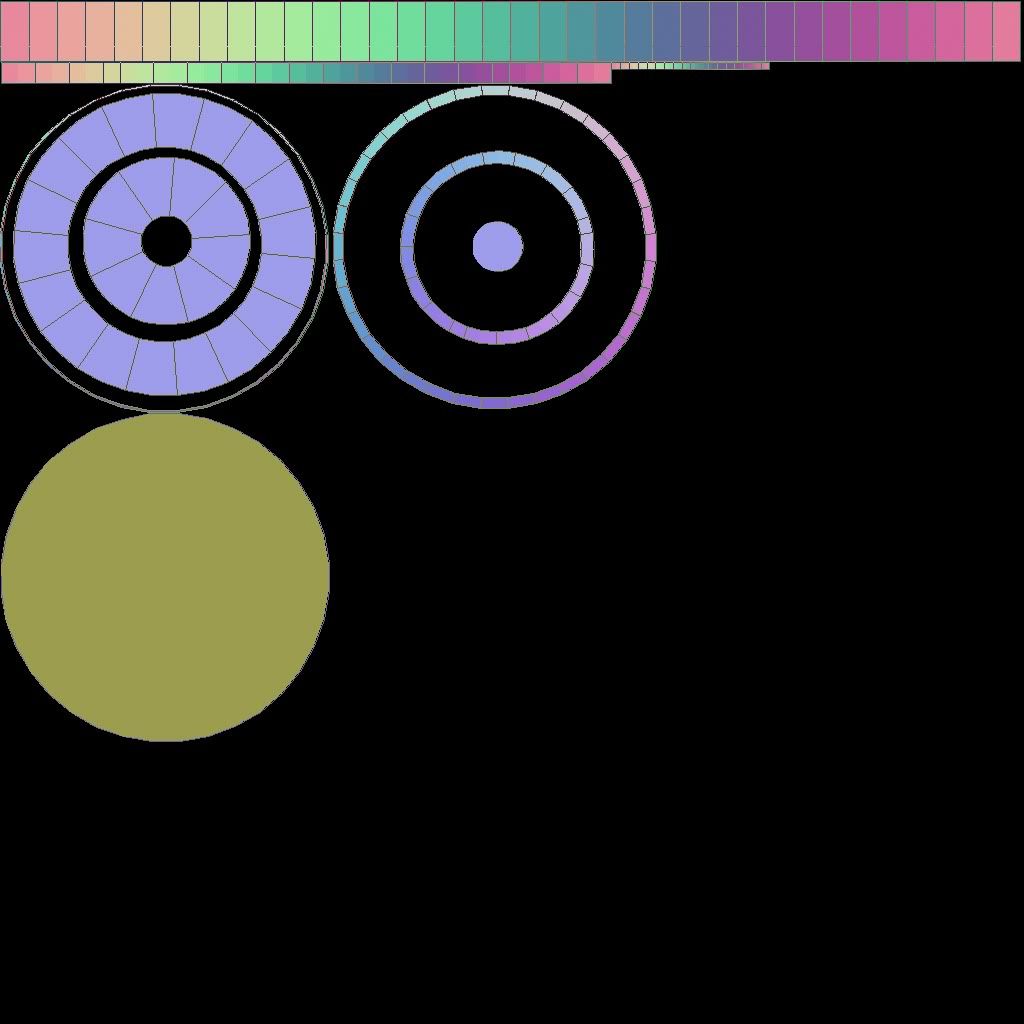
Works best with circles for obvious reasons.
Try to put things inside of other things whenever you can to use up space, and save space for larger more important parts.
Works best with circles for obvious reasons.
Try to put things inside of other things whenever you can to use up space, and save space for larger more important parts.
-
Wilkinson
- Posts: 1916
- Joined: 2008-08-18 21:55
Re: [Weapon] mk19 [WIP]
uhm From what I've been reading..No it isnt??boilerrat wrote:Here is a good example of efficient spacing.
Works best with circles for obvious reasons.
Try to put things inside of other things whenever you can to use up space, and save space for larger more important parts.
You could have put the 2nd row of circles in one big circle with minimal spacing to reduce wasted Pixels. Just have scaled it so that instead of 2 circles youd have one...
Didnt Drav state that in your claymore thread?
-
Rhino
- Retired PR Developer
- Posts: 47909
- Joined: 2005-12-13 20:00
Re: [Weapon] mk19 [WIP]
Nope that's pretty bad. You would get overlapping textures epically in the mipmaps.boilerrat wrote:Here is a good example of efficient spacing.
http://i300.photobucket.com/albums/nn17 ... mineuv.jpg
Works best with circles for obvious reasons.
Try to put things inside of other things whenever you can to use up space, and save space for larger more important parts.
-
DeltaFart
- Posts: 2409
- Joined: 2008-02-12 20:36
Re: [Weapon] mk19 [WIP]
What he said, that isnt' the best I've ever seen....[R-DEV]Rhino wrote:Nope that's pretty bad. You would get overlapping textures epically in the mipmaps.
-
Wilkinson
- Posts: 1916
- Joined: 2008-08-18 21:55
Re: [Weapon] mk19 [WIP]
Tried Re-Doing my Sheet.
So far we are sitting at about 3% Pixel loss on a 1024x 512 sheet. Which Will be used for this weapon I think. Good point at where we are.
Still fixing as we go. But here we are so far

So far we are sitting at about 3% Pixel loss on a 1024x 512 sheet. Which Will be used for this weapon I think. Good point at where we are.
Still fixing as we go. But here we are so far
-
Rhino
- Retired PR Developer
- Posts: 47909
- Joined: 2005-12-13 20:00