Yes the time switch is controlled by python. In this case the easiest fix is with python as there is a local variable that allows you to remove start time.
velosong wrote:i have checked the python file. Just found the code in realityconfig_coop.py
Code: Select all
#
# Enable/Disable start delay on vehicles
# Default is enabled
C['VEHICLES_START_DELAY'] = 1
#
velosong wrote:
i changed this number to "0" in test but obviously it is not the right one.
i remember there are some files like us_tnk_m1a2_bf2, but it is nothing more sepcial than us_tnk_m1a2 , besides, which file controlls the switch time, python PY file or vehicle tweak ?
velosong you were very close but bear in mind the realityconfig_coop.py is intended for dedicated coop servers, and you are likely using local for what you are doing. To make the same change for use in a local server go to realityconfig_local.py and make that same change:
->
(line 804)
Another method is to rename the player control object for the gunners seat of the vehicle in question, which should disable most python rules on it. Make sure you are opening the latest version of the file, for example if sample1.tweak is contained in both vehicles_server.zip and vehicles_server_patch1.zip then you need to change the one in the patch1 zip because it overwrites the original when you load the files.
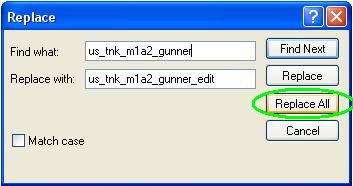
Go into the latest tweak and con (the latest con is probably in the original zip while the latest tweak is probably in the patch1 zip) and you need to find the name of the gunner pco. To do this open each file in notepad, and search for "PlayerControlObject" (using ctrl-f) and it should appear only twice in each. The second time it appears it should be followed by a name that has the word "gunner" in it (for example in the abrams it is called "us_tnk_m1a2_Gunner". Once you have found this name you need to go to the top of both the tweak and con and do a replace (ctrl+h) and replace that name with the same name with the word edit on the end (eg "us_tnk_m1a2_Gunner" with "us_tnk_m1a2_Gunner_edit"). After that you should be good to go.
If you are confused by any part just let me know and I'll explain that part in more detail. If you get a crash run in windowed mode and let me know what error message pops up (I can explain how to do that if you need also). Finally if all goes well and you want to change it back then just do another replace except the other way around (eg replace "us_tnk_m1a2_Gunner_edit" with "us_tnk_m1a2_Gunner").
Hope that either of those methods works for you!






 I test your methods, here are the results:


 Follow your steps i succeed in removing the tank turret waitting time. As i saw, the PY code just like a switch which control the whole time delay system; and , renaming playercontrol template just disable the extra Gunner which relate to the time delay setting。