how to remove the gunner/driver switch time?

General discussion of the Project Reality: BF2 modification.
Post Reply
velosong
Posts: 49
Joined: 2007-11-20 00:42

how to remove the gunner/driver switch time?

Post by velosong »

I post this thread 2 days before in other place but no answer. So, i post this thread here. sorry for that i, i just want to solve my problem soon.


all i want is just testing my modified tank maingun . (in fact, i modify some codes in coop game, of course play with AI)

BUt unfortunately, i have to wait a loooooooooong time to see how my gun works :(

how to remove the gunner/driver switch time? i just search all the tank tweak file, nothing has be found.


i absolutely agree the waitting time design in PR, but when i `m palying with AI in coop mode , testing my own modify, this setting waste time in fact.

expecting someone light me the way :-?
Amir
Posts: 167
Joined: 2010-03-10 19:35

Re: how to remove the gunner/driver switch time?

Post by Amir »

There are tanks and APC's where there's only one person needed to control it like in Vanilla BF2. So no need to use the multiplayer/humancontrolled vehicles in coop.
Eat Crayons, Poop Rainbows
Image
Image
Rudd
Retired PR Developer
Posts: 21225
Joined: 2007-08-15 14:32

Re: how to remove the gunner/driver switch time?

Post by Rudd »

There are tanks and APC's where there's only one person needed to control it like in Vanilla BF2. So no need to use the multiplayer/humancontrolled vehicles in coop.
yeah do this I think, the switch time is controlled by python code iirc
Image
boilerrat
Posts: 1482
Joined: 2009-09-02 07:47

Re: how to remove the gunner/driver switch time?

Post by boilerrat »

Wouldn't this be more appropriate in the community modding section?
Image
Trooper909
Posts: 2529
Joined: 2009-02-26 03:02

Re: how to remove the gunner/driver switch time?

Post by Trooper909 »

boilerrat wrote:Wouldn't this be more appropriate in the community modding section?
Me thinks that is where he did post it and didnt get a reply (R-MOD)boilerrat ;-)
Rudd
Retired PR Developer
Posts: 21225
Joined: 2007-08-15 14:32

Re: how to remove the gunner/driver switch time?

Post by Rudd »

gentlemen, use the moderation options - report feature rather than bumping topics that don't need to be bumped
Image
Teek
Posts: 3162
Joined: 2006-12-23 02:45

Re: how to remove the gunner/driver switch time?

Post by Teek »

it would probably be easier to put the modded cannon code into a small arm or .50 cal and then put it back in the tank when your done with it, oh and you get tons of lol with your tank pistol :P
Image
velosong
Posts: 49
Joined: 2007-11-20 00:42

Re: how to remove the gunner/driver switch time?

Post by velosong »

i`m`sorry to put this topic once again.

i did try some other key words in searching, form "switch" to "time" , but found nothing useful, besides, my topic post in the community modding section dosen`t have any reply, so, i try here again. I`m very sorry about that.

the switch time is controlled by python code iirc
thanks for your clue! could you please show where the codes are precisely? At lease, which file?
Cobhris
Posts: 576
Joined: 2008-06-11 07:14

Re: how to remove the gunner/driver switch time?

Post by Cobhris »

Use the 1 man co-op tanks. There are special tanks on the co-op maps that only require a single crewman to operate (for the bots, but I use them when I just want to play a singleplayer game).
Image

The Soviets may have only gotten as far as East Germany, but they took the rest of the continent without firing a single shot.

NObama 2012!
velosong
Posts: 49
Joined: 2007-11-20 00:42

Re: how to remove the gunner/driver switch time?

Post by velosong »

the switch time is controlled by python code iirc
i have checked the python file. Just found the code in realityconfig_coop.py

Code: Select all

#
# Enable/Disable start delay on vehicles
# Default is enabled
C['VEHICLES_START_DELAY'] = 1
#

i changed this number to "0" in test but obviously it is not the right one.


Use the 1 man co-op tanks. There are special tanks on the co-op maps that only require a single crewman to operate (for the bots, but I use them when I just want to play a singleplayer game).
i remenber there are some files like us_tnk_m1a2_bf2, but it is nothing more sepcial than us_tnk_m1a2 , besides, which file controlls the switch time, python PY file or vehicle tweak ?
Sniperdog
Retired PR Developer
Posts: 1177
Joined: 2009-02-27 00:06

Re: how to remove the gunner/driver switch time?

Post by Sniperdog »

Yes the time switch is controlled by python. In this case the easiest fix is with python as there is a local variable that allows you to remove start time.
velosong wrote:i have checked the python file. Just found the code in realityconfig_coop.py

Code: Select all

#
# Enable/Disable start delay on vehicles
# Default is enabled
C['VEHICLES_START_DELAY'] = 1
#
velosong wrote: i changed this number to "0" in test but obviously it is not the right one.

i remember there are some files like us_tnk_m1a2_bf2, but it is nothing more sepcial than us_tnk_m1a2 , besides, which file controlls the switch time, python PY file or vehicle tweak ?
velosong you were very close but bear in mind the realityconfig_coop.py is intended for dedicated coop servers, and you are likely using local for what you are doing. To make the same change for use in a local server go to realityconfig_local.py and make that same change:

Code: Select all

C['VEHICLES_START_DELAY'] = 1
->

Code: Select all

C['VEHICLES_START_DELAY'] = 0
(line 804)


Another method is to rename the player control object for the gunners seat of the vehicle in question, which should disable most python rules on it. Make sure you are opening the latest version of the file, for example if sample1.tweak is contained in both vehicles_server.zip and vehicles_server_patch1.zip then you need to change the one in the patch1 zip because it overwrites the original when you load the files.

Go into the latest tweak and con (the latest con is probably in the original zip while the latest tweak is probably in the patch1 zip) and you need to find the name of the gunner pco. To do this open each file in notepad, and search for "PlayerControlObject" (using ctrl-f) and it should appear only twice in each. The second time it appears it should be followed by a name that has the word "gunner" in it (for example in the abrams it is called "us_tnk_m1a2_Gunner". Once you have found this name you need to go to the top of both the tweak and con and do a replace (ctrl+h) and replace that name with the same name with the word edit on the end (eg "us_tnk_m1a2_Gunner" with "us_tnk_m1a2_Gunner_edit"). After that you should be good to go.

If you are confused by any part just let me know and I'll explain that part in more detail. If you get a crash run in windowed mode and let me know what error message pops up (I can explain how to do that if you need also). Finally if all goes well and you want to change it back then just do another replace except the other way around (eg replace "us_tnk_m1a2_Gunner_edit" with "us_tnk_m1a2_Gunner").

Hope that either of those methods works for you!

Last edited by Sniperdog on 2010-07-30 07:27, edited 1 time in total.
Image

Image

Will Stahl aka "Merlin" in the Squad community
velosong
Posts: 49
Joined: 2007-11-20 00:42

Re: how to remove the gunner/driver switch time?

Post by velosong »

to [R-CON]Sniperdog,

thanks very much! :) I test your methods, here are the results:

1, the PY

i modify the realityconfig_local.py, it works, but it just removes the vehicle warm-up time, like aircraft. Unfortunately, the M1a2 turret still need 30 second waitting to operate.


2, the con and tweak

i modify the us_tnk_m1a2.con in vehicles_server.zip\vehicles\Land\us_tnk_m1a2

and the us_tnk_m1a2.tweak in vehicles_server_patch1.zip\vehicles\Land\us_tnk_m1a2

change the

Code: Select all

PlayerControlObject us_tnk_m1a2_Gunner
to

Code: Select all

PlayerControlObject us_tnk_m1a2_Gunner_edit
After that, game crushed with error showing like this:

Code: Select all

Text:us_tnk_m1a2addbundleChild() template not found:us_tnk_m1a2_gunner
I guess the us_tnk_m1a2_gunner_edit just dosen`t work.

Image


i think, the methods above are the ways of shutting down the whole time delay system.

But consider it from another side, there should be some codes defining how many seconds the player have to wait to operate the tank main cannon after switching to turret position (F2). where this number is, maybe is the key, i guess.
Last edited by velosong on 2010-07-30 18:20, edited 3 times in total.
ballard_44
Retired PR Developer
Posts: 1204
Joined: 2007-05-30 22:47

Re: how to remove the gunner/driver switch time?

Post by ballard_44 »

velosong wrote: Unfortunately, the M1a2 turret still need 30 second waitting to operate.
Weird, that code should also reduce the waiting period to about 8 - 10 seconds once you switch.
Or however long it takes for a round to be loaded into the cannon.

Use to anyways.
I guess the us_tnk_m1a2_gunner_edit just dosen`t work.
It's a little more complicated than how Sniperdog described it.

And unless you never plan on playing PR online, you need to be making backups of the files you are editing.
Image
Sniperdog
Retired PR Developer
Posts: 1177
Joined: 2009-02-27 00:06

Re: how to remove the gunner/driver switch time?

Post by Sniperdog »

velosong wrote:2, the con and tweak

i modify the us_tnk_m1a2.con in vehicles_server.zip\vehicles\Land\us_tnk_m1a2

and the us_tnk_m1a2.tweak in vehicles_server_patch1.zip\vehicles\Land\us_tnk_m1a2

change the

Code: Select all

PlayerControlObject us_tnk_m1a2_Gunner
to

Code: Select all

PlayerControlObject us_tnk_m1a2_Gunner_edit
After that, game crushed with error showing like this:

Code: Select all

Text:us_tnk_m1a2addbundleChild() template not found:us_tnk_m1a2_gunner
I guess the us_tnk_m1a2_gunner_edit just dosen`t work.

Image


i think, the methods above are the ways of shutting down the whole time delay system.

But consider it from another side, there should be some codes defining how many seconds the player have to wait to operate the tank main cannon after switching to turret position (F2). where this number is, maybe is the key, i guess.
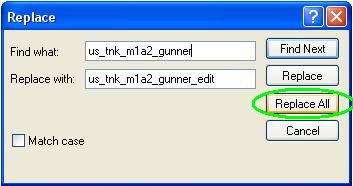
Read my directions a little more carefully. You cant just replace that one place where I told you to look for it you have to replace us_tnk_m1a2_gunner with us_tnk_m1a2_gunner_edit every time it occurs in both the con and the tweak. The way to do this is using the replace function in notepad (control + h) and do hit "replace all" so it changes every instance. The only places where the replace needs to occur is at the child definition line (add template) the create line the activesafe line and the seat information line, but it is easiest for you just to replace all instances of the phrase in both documents, which will do the same thing. Here is a pic:
Image
As [R-DEV]ballard_44 said you should always make a backup of anything you change in case you mess something up.

As far as your second question goes, yes there is indeed a place in the python code where warm up time for any pco that has one is defined, and this is done by name. To protect the sheer volume of custom code we have from theft we keep it compiled, which means you will not be able to change it without the source code (which I sincerely hope you don't have :P )

Good Luck!
Last edited by Sniperdog on 2010-07-31 18:15, edited 1 time in total.
Image

Image

Will Stahl aka "Merlin" in the Squad community
velosong
Posts: 49
Joined: 2007-11-20 00:42

Re: how to remove the gunner/driver switch time?

Post by velosong »

Code: Select all

but this code is compiled which means you will not be able to change it without the source code (which I sincerely hope you don't have :P )
No wonder i couldn't find the code defining how many seconds player have to wait, you clever guys :shock:


Thank you so much for your patient explanations ! :D Follow your steps i succeed in removing the tank turret waitting time. As i saw, the PY code just like a switch which control the whole time delay system; and , renaming playercontrol template just disable the extra Gunner which relate to the time delay setting。

By solving this problem, i saw the genius work you have done! PR is absolutely the best mod i ever play! :grin: :grin: :grin:
Sniperdog
Retired PR Developer
Posts: 1177
Joined: 2009-02-27 00:06

Re: how to remove the gunner/driver switch time?

Post by Sniperdog »

velosong wrote:By solving this problem, i saw the genius work you have done! PR is absolutely the best mod i ever play! :grin: :grin: :grin:
Glad we could help and thank you! :)
Image

Image

Will Stahl aka "Merlin" in the Squad community
Post Reply

Return to “PR:BF2 General Discussion”