[?] Height Map Edit Theory

Making or wanting help making your own asset? Check in here
Post Reply
Tomking
Posts: 110
Joined: 2010-02-13 03:55

[?] Height Map Edit Theory

Post by Tomking »

Editing height terrain inside the editor as most of us have experienced can be very time consuming and tedious. I've worked with L3DT before and just couldn't get a very firm grasp of it. I have heard that GeoControl2 and other programs were very good but have yet to give them a try because heck, I'm still trying to get my head wrapped around the BF2 Editor engine.

So I had a bit of a brainstorm and thought to myself, I'm a professional graphic design by trade.. there has to be a way to do this in photoshop that will make my life easier instead of learning new software and striking out time and time again.

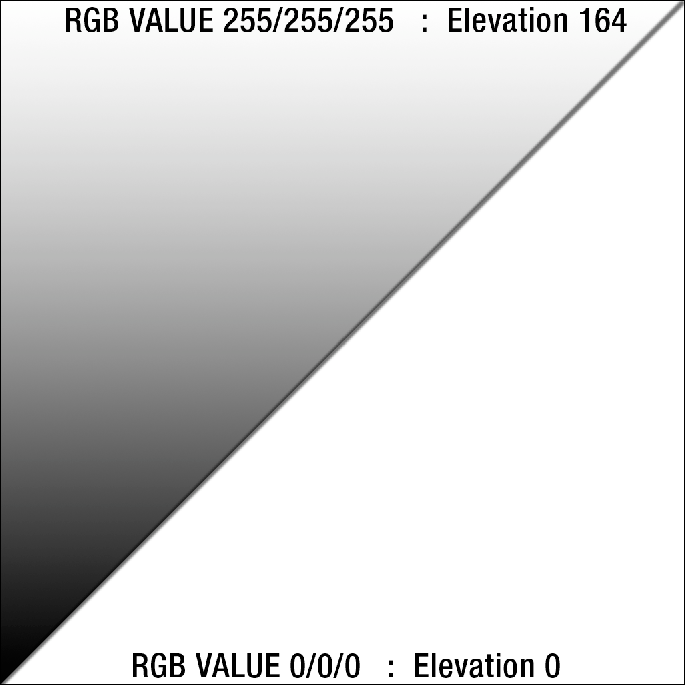
Inside the editor I've found that the range of the height field is approximately 0-164 units (meters I assume). The Height map renders as a grayscale file so we can assume that
RGB 0/0/0 (BLACK) is equivalent to 0 and RGB 255/255/255 (WHITE) is max height 164.

RGB Height Map Theory Render
Image


Proof of Concept
I'd like to convert my 2km Mustaj into a 4km map. Which has a lot of hills that will need to be softened and a lot of mountains to recreate. Not to mention I'd like to make my mountainous regions more realistic. I know that I am much for efficient at using photoshop than I am at using the BF2 shaping tools. So I am going to be creating my mountains using this theoretical method and try to employ them into a 4km version of my map. If it works then I will smooth and tweak the 'warpy' areas in the editor and then render my valleys with the BF2 editor tools since they need a bit more finese.

1024x1024 Render This is just the start
Image

Please tell me your thoughts on using this method below.
Last edited by Tomking on 2010-12-23 18:15, edited 2 times in total.
Tim270
PR:BF2 Developer
Posts: 5166
Joined: 2009-02-28 20:05

Re: [?] Height Map Edit Theory

Post by Tim270 »

Heh I have been tweaking CoH H maps in PS for ages. I find it easier than the editor (even though its very easy) I had to build quite a few custom brushes for mico-terrain though. But yeah, PS is a effective way to get it done.
Image
sylent/shooter
Posts: 1963
Joined: 2009-04-10 18:48

Re: [?] Height Map Edit Theory

Post by sylent/shooter »

I think I'd personally have a tough time using this method tbh. I wouldn't know what it would look like in the editor and I'd probably completely screw something up. Allow I know it's been done and you probably will get a better finished product. (if done correctly) I think try and use the BF editor tools to get the "rough" outline for your map and then like Tim270 said, just tweak it in PS

Killing the enemy sylently
Rhino
Retired PR Developer
Posts: 47909
Joined: 2005-12-13 20:00

Re: [?] Height Map Edit Theory

Post by Rhino »

yes a heightmap is just a gray scale image, with black being low terrain and white being high terrain and yes you can edit your terrain in photoshop, I use to make the base of my terrain in photoshop all the time which was in fact how I made Qinling was with photoshop, then tweaked in the editor and painted with L3DT.
Image
Zeno
Posts: 3430
Joined: 2008-09-07 14:16

Re: [?] Height Map Edit Theory

Post by Zeno »

remember if you change your mapheight you can get a bigger span from bottom and top of your map, resulting in a more realistic and spectacular terrain :grin:
Image
[R-DEV]Ninja2dan: Not having a spotter is like masturbating with a cheese grater...mildly amusing at first, but generally painful and bloody in the end.

Thornehaw: If all this have been evidently true, Battlefield is a much scarier and dirtier than ever imagined. Not a conspiracy, but a possibility. If it is true, then trusting another is quite worrisome.
Tomking
Posts: 110
Joined: 2010-02-13 03:55

Re: [?] Height Map Edit Theory

Post by Tomking »

@ Zeno, Can you elaborate on what values need to change in order to alter the total map height?

Also, can anyone explain why I'm experiencing and error converting my .psd into a .raw that is compatabile to be opened with the bf2editor.

Here are the steps I'm following.

1. open my heightmapprimary.psd in photoshop, set as greyscale, 72dpi - resized the image to 1025/1025 by going to image -> image size - set the channel bit to 16 instead of 8

2. saved the image as photoshop RAW. and with the exact name: HeightmapPrimary.Raw toggled IBM save file

3. opened the new heightmapprimary.raw and when the "describe "heightmapprimary.raw" pops up im making sure the chanels are set to 1 and the depth from 8 bits to 16 bits marking IBM PC not macintosh.

4. File opens and looks correct in photoshop, same specs - 16bit ibm 1025x1025

5 close file, copy into editor and replace the existing heightmapprimary, fire up editor and stare at flat level terrain
Last edited by Tomking on 2010-12-24 00:00, edited 2 times in total.
Tomking
Posts: 110
Joined: 2010-02-13 03:55

Re: [?] Height Map Edit Theory

Post by Tomking »

This morning I was able to load the 'hmp'.raw into l3dt and smooth all the extreme warpy areas

When i exported it as a .raw and placed it into my level folder it again rendered as completely flat when loaded in.
Tomking
Posts: 110
Joined: 2010-02-13 03:55

Re: [?] Height Map Edit Theory

Post by Tomking »

Anyone care to take a stab at this and figure out what I'm doing wrong?

File attached.
You do not have the required permissions to view the files attached to this post.
Outlawz7
Retired PR Developer
Posts: 17261
Joined: 2007-02-17 14:59

Re: [?] Height Map Edit Theory

Post by Outlawz7 »

Tomking wrote:@ Zeno, Can you elaborate on what values need to change in order to alter the total map height?
In editor, TweakerBar, level tab, level settings, terrain height (max value)

Also your primary terrain works fine on my end.
Image
Tomking
Posts: 110
Joined: 2010-02-13 03:55

Re: [?] Height Map Edit Theory

Post by Tomking »

I can't figure out the heightmapprimary issue I'm having then.

When I load my map it's just flat.

The 4km map I made is completely untouched setting wise. Just a standard blank 4km canvas.

I copy/replaced the HMP with the one I created. Turned on the editor, loaded in pr_edit, then imported terrain my level... loads fine and poof - flatness

If the HMP.raw looks fine, are there any steps that I might not have done to make the editor accept the height values of the .raw file?
Amok@ndy
Retired PR Developer
Posts: 5144
Joined: 2008-11-27 22:13

Re: [?] Height Map Edit Theory

Post by Amok@ndy »

try changing the terrain a lil bit and recompile the terrain (just save your map)
Image
Tomking
Posts: 110
Joined: 2010-02-13 03:55

Re: [?] Height Map Edit Theory

Post by Tomking »

Next trial ended in failure.

Placed my edited HMP.raw into my level folder. Loaded the map, again showed up being flat.

Slightly raised part of the terrain to access Save functionality.

Saved - Terrain, Compiled Detail/Color ect

Closed Editor.

Loaded Editor and Map again - crashed upon load - failure to read height.

checked the .raw and it opened fine, but was now flat gray in color instead of showing my mountain color values
Tomking
Posts: 110
Joined: 2010-02-13 03:55

Re: [?] Height Map Edit Theory

Post by Tomking »

Tried applying the 1025x1025 'hmp'.raw to a copied version of my 2km map.

Upon load it retained the previous heightmap values and elevations.

Looked at the raw in the level folder, it was the updated version.

Saved the map in the bf2 editor as a copy compiled terrain.

Checked the new copy map level folder HMP and it opened to reveal the previously retained hmp.raw
Tomking
Posts: 110
Joined: 2010-02-13 03:55

Re: [?] Height Map Edit Theory

Post by Tomking »

Status update.

Toggled my HeightmaPrimary.Raw to be Read Only.
Placed it in level fodler and loaded map.

Editor Rendered the Files Height Values - Hooray.

Untoggled the Read Only in the .Raw, Saved Terrain/Compiled Terrain Settings.

Closed Editor and Reloaded Map.

Map Retained Height Values.

Great Success.

Thanks Andy.
Post Reply

Return to “PR:BF2 Community Modding”