So I had a bit of a brainstorm and thought to myself, I'm a professional graphic design by trade.. there has to be a way to do this in photoshop that will make my life easier instead of learning new software and striking out time and time again.
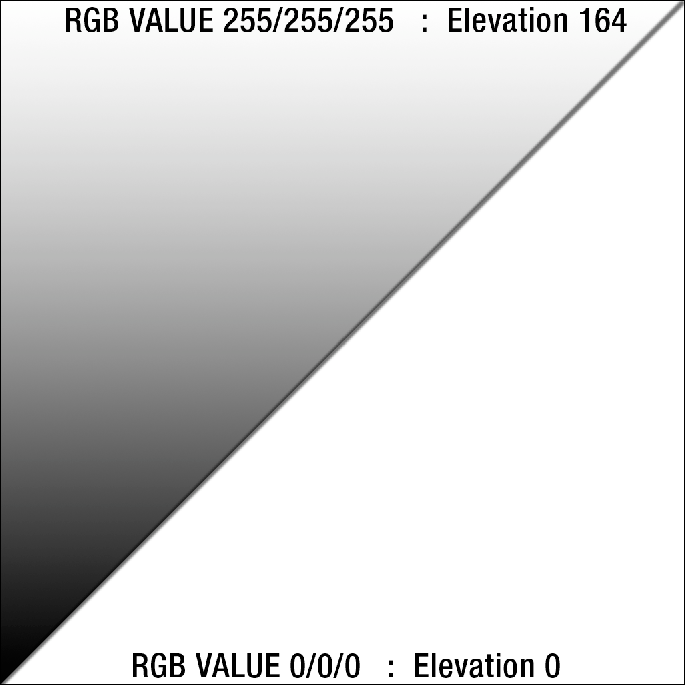
Inside the editor I've found that the range of the height field is approximately 0-164 units (meters I assume). The Height map renders as a grayscale file so we can assume that
RGB 0/0/0 (BLACK) is equivalent to 0 and RGB 255/255/255 (WHITE) is max height 164.
RGB Height Map Theory Render
Proof of Concept
I'd like to convert my 2km Mustaj into a 4km map. Which has a lot of hills that will need to be softened and a lot of mountains to recreate. Not to mention I'd like to make my mountainous regions more realistic. I know that I am much for efficient at using photoshop than I am at using the BF2 shaping tools. So I am going to be creating my mountains using this theoretical method and try to employ them into a 4km version of my map. If it works then I will smooth and tweak the 'warpy' areas in the editor and then render my valleys with the BF2 editor tools since they need a bit more finese.
1024x1024 Render This is just the start

Please tell me your thoughts on using this method below.