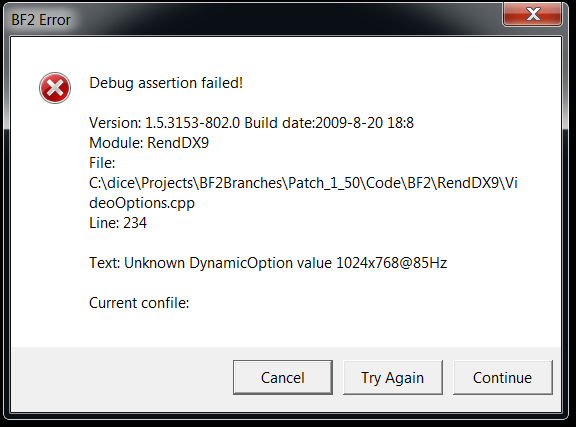
All iv done since it was working last was change my monitor!
(win7, GTX 260 black edition, 42" philips HD LCD)



please help..System.Exception: There was an error writing a new file in the profiles directory. Details as follows.
---> System.UnauthorizedAccessException: Toegang tot het pad C:\Users\bram\Documents\Battlefield 2\Profiles\0002\General.con is geweigerd.
bij System.IO.__Error.WinIOError(Int32 errorCode, String maybeFullPath)
bij System.IO.File.Delete(String path)
bij c.c(Boolean A_0)
--- Einde van intern uitzonderingsstackpad ---
bij c.c(Boolean A_0)
bij g.a(String[] A_0)
[R-COM]SnipingCoward wrote:@polka: please show us what your video.con looks like, especially the resolution line. It appears the value is missing something like "@60Hz" (-> "800x600@60Hz").
Default settings since I reinstalled BF2. I'll try what you suggested, Burgh.VideoSettings.setTerrainQuality 2
VideoSettings.setGeometryQuality 2
VideoSettings.setLightingQuality 2
VideoSettings.setDynamicLightingQuality 2
VideoSettings.setDynamicShadowsQuality 2
VideoSettings.setEffectsQuality 2
VideoSettings.setTextureQuality 2
VideoSettings.setTextureFilteringQuality 2
VideoSettings.setResolution 800x600@60Hz
VideoSettings.setAntialiasing Off
VideoSettings.setViewDistanceScale 1
VideoSettings.setVideoOptionScheme 1

I recently bought BF2 installed it and installed project reality.Moldylunchbox wrote:AHA! It works now, I googled around to find a picture of what the default settings should be in the con file and opened up notepad and copied everything down and saved it
VideoSettings.setTerrainQuality 3
VideoSettings.setGeometryQuality 3
VideoSettings.setLightingQuality 2
VideoSettings.setDynamicLightingQuality 3
VideoSettings.setDynamicShadowsQuality 3
VideoSettings.setEffectsQuality 3
VideoSettings.setTextureQuality 3
VideoSettings.setTextureFilteringQuality 3
VideoSettings.setResolution 1024x768@85Hz
VideoSettings.setAntialiasing Off
VideoSettings.setViewDistanceScale 1
VideoSettings.setVideoOptionScheme 2
Runs fine now...for some reason when I installed the game there was no default settings for video so every time I went to run the game the computer was like "I don't know how you want this displayed!" and crashed.
so anyway, If you have the same problem just copy the video settings and paste them into notepad and save as a .CON.
I tried copy and pasting your text in there and tried saving it as Video.con but got "access denied" popup.rem Optimal setting for CPU > 1400 MHZ
game.setGameDisplayMode 800 600 32 0
game.setDetailTexture 4
game.setShadows 1
game.setEnvironmentMapping 1
game.setGraphicsQuality 3
game.setLightmaps 1
game.setRenderWhenSpawnMenu 1
game.setMenuViewdistance 100
game.setEffectsQuality 3
game.setPerformance 3
 Re: BF2 win 7 issues
 .
.