[WIP] [Vehicle] Super Etendard

Making or wanting help making your own asset? Check in here
Post Reply
anantdeathhawk
Posts: 641
Joined: 2015-11-12 21:11

Re: [WIP] [Vehicle] Super Etendard

Post by anantdeathhawk »

Update:

Things done: TRIS all inclusive-7414
1.Attached the cockpit back to the fuselage.
2.Made the cockpit glasses as a separate object.
3.Modified the stablizers a bit to match as its in real life.
4.Made the fuselage more rounder on the top and the sides.

Video:


Screens:
Image
Image
Image
Image
Image
Image
Image
Image
Image
Image
Image
Image
Image
Image

Does it needs more pylons?(There's one pylon for exocet and one for general purpose bomb.)
Do you consider this 3P model done?
Rhino
Retired PR Developer
Posts: 47909
Joined: 2005-12-13 20:00

Re: [WIP] [Vehicle] Super Etendard

Post by Rhino »

Looking good but a few things that needs tweaking, will try to give more detailed feedback later but hopefully someone else will beat me to it ;)
Image
anantdeathhawk
Posts: 641
Joined: 2015-11-12 21:11

Re: [WIP] [Vehicle] Super Etendard

Post by anantdeathhawk »

Okay, i'll wait for the detailed feedback.
Rhino
Retired PR Developer
Posts: 47909
Joined: 2005-12-13 20:00

Re: [WIP] [Vehicle] Super Etendard

Post by Rhino »

Don't need to wait on doing any chances if there is something you or anyone else sees that can be improved in the mean time, can't say when I'll have the time/energy to give you some detailed feedback, but for now on your question about the hard points, firstly the Exocet seems to always be seen on the right/starboard wing, where your Exocet Pylon is on the left wing right now, best to swap that round and your Exocet Pylon could be optimized a little too ;)

Would also add two smaller missile/bomb hard points to the outer wings since while the SE was never armed with missiles during the Falklands war, we will be giving it some R.550 Magic missiles to help defend itself and to give it something to do if/when all the ships are sunk :p
Image

EDIT: Also don't forget to model the drop tank too :)
Last edited by Rhino on 2016-11-17 17:21, edited 1 time in total.
Image
anantdeathhawk
Posts: 641
Joined: 2015-11-12 21:11

Re: [WIP] [Vehicle] Super Etendard

Post by anantdeathhawk »

Update:
Total tris 8167

New:
1.Fuel pod.
2.Two new pylons.

Editted the exocet pylon and fuel pod pylon.The fuel pod has 18 sides.

Screens:
Image
Image
Image
Image
Image
Image
Image
Image
Image
Image
Image
Rhino
Retired PR Developer
Posts: 47909
Joined: 2005-12-13 20:00

Re: [WIP] [Vehicle] Super Etendard

Post by Rhino »

Ok here is some feedback to keep you busy.

Lets start with the back.
Image
This loop pointed out with red arrows inside the exhaust, isn't required. Dosen't give it any sturcture that the player can see and just wastes tris, so you can can simply remove it, leaving a nice cone and to anyone looking in, will look exactly the same :)
Next in green are some edges you should add in as otherwise it can end up diffrently from what you want if you don't define it, espically after exporting it to BF2.
In yellow, something doesn't look right here, looks like it dimples in on the fusalarge which I'm sure it shouldn't?

Next going by this picture here: http://i.imgur.com/gKMr2e6.png
Looks like your exhaust isn't perfectly round, do you have any refs to support this? All the refs I can find show to me that it should be perfectly round? First picture you can see the frame around the exhaust on the right too:
Image
Image
Image
Image

Also don't forget to add the arrester hook ;)
Image

Next moving onto the Elevators, I see you've modelled the base of them, as you can see clearly in the top left of this pic:
Image
This tbh, isn't such a good idea, since they are so thin, they will just zfight like crazy with the face of the tail under them and will look horrible ingame.
I can see why you did this because it looks like at first glance that the entire elevator moves for when the pilot pitches, but I'm pretty sure this isn't the case since if you look at the refs clearly, you can see its got elevator flaps on the end of them, and "I'm assuming" that the entire tail can only be rotated on the ground, before takeoff, or at least doesn't rotate in normal flight manuvers (may rotate with the flaps control or something howerver, can anyone confirm how/when it rotates?):
Image
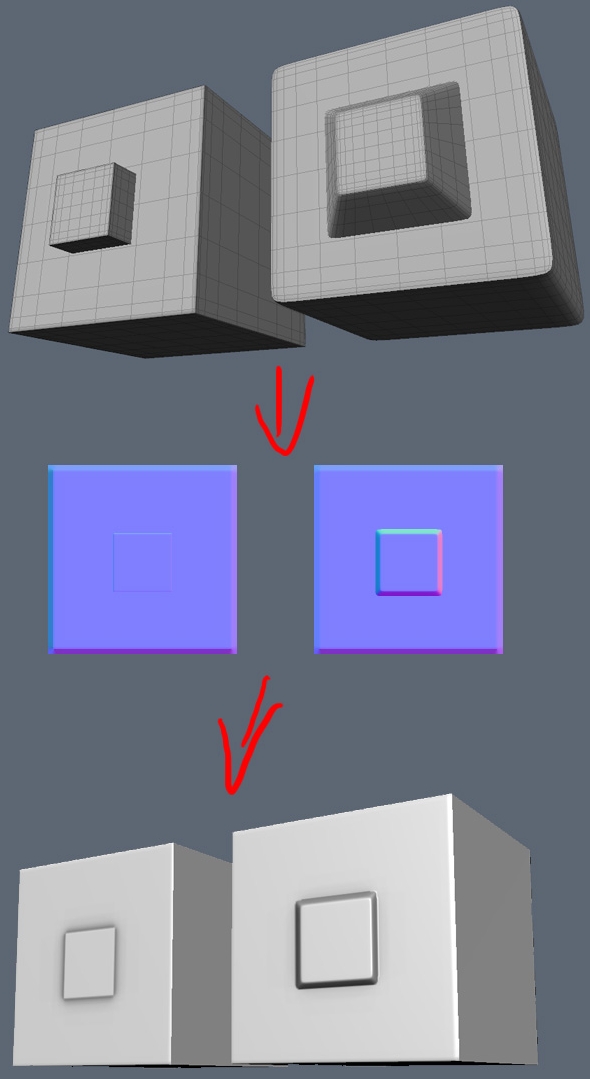
Anyways there are a few ways I can see about going about this but if we are going to have the tail wing in a fixed stance which is the simplest thing, then what I would recommend is removing your modelled base and instead have it textured onto the side of the tail thin with a normal map which will bump it out as much as if it was modelled there, but will save a lot of tris, UV space and most importantly, will not zfight ;)
You also need to model in those elevator flaps onto the tail wing btw ;)

Image
Next I don't see any need for this line down the middle of the tail wing, circled in red? Think you can remove that. Also drawn in yellow where to put the elevator flaps.
Moving onto the main wings in the same shot, on the left I've circled in red again these loops I don't see any need for, they just screw up the smoothing and add extra tris? You also seem to have missed out the Alerions flaps from the wings, although you have the main big inner landing flaps, the Alerions are the more imporant ones since they control the aircraft's roll, the landing flaps just create more lift and drag for landing. I've also outlined in green the area, more or less, where the wing can fold up. While we possibly wont ever use this ingame, would be still nice to model this aircraft so its wings can fold up as I do see a potential use for it ingame and won't take up that much more tris or UV space to do so worth modelling in the potential of having it ;)
I've also penciled out with small red lines on the right the best possible tri layout, after removing those unessary loops and adding in the alerion flaps and seprating the foldable tips off from the main wings :D

Also a lot of these loops highlighted in green I don't think are needed, some might be but most of them aren't affecting the shape at all and can be lost, and others can also be optimized down so you only need them on parts you do and others you don't, just because something is welded to the top or bottom, dosen't mean you need the loop to countiue all the way around if that loop does nothing to the strucure or smoothing :D
Most likley others not highlighted in that pic too that can be removed too btw ;)
Image

It's good you've made your fusalarge etc smoother than before but tbh, still think it could be quite a bit smoother than it is now and with the tris you've saved in other areas, think you can spend them here on making this thing look smooth and sleek :D
Main thing would be to add a central line down the top of the fuslarge and though the cockpit, and then doubling up on every other segment, which then will give a much nicer smoothness to the whole thing :D
Image
The nose can also have some segments collapsed as it gets smaller and if your worried about smoothing, best to control it with a high poly bake ;)
Also note how the front window is smaller at the top than it is at thew bottom, whgere your's currently isn't:
Image

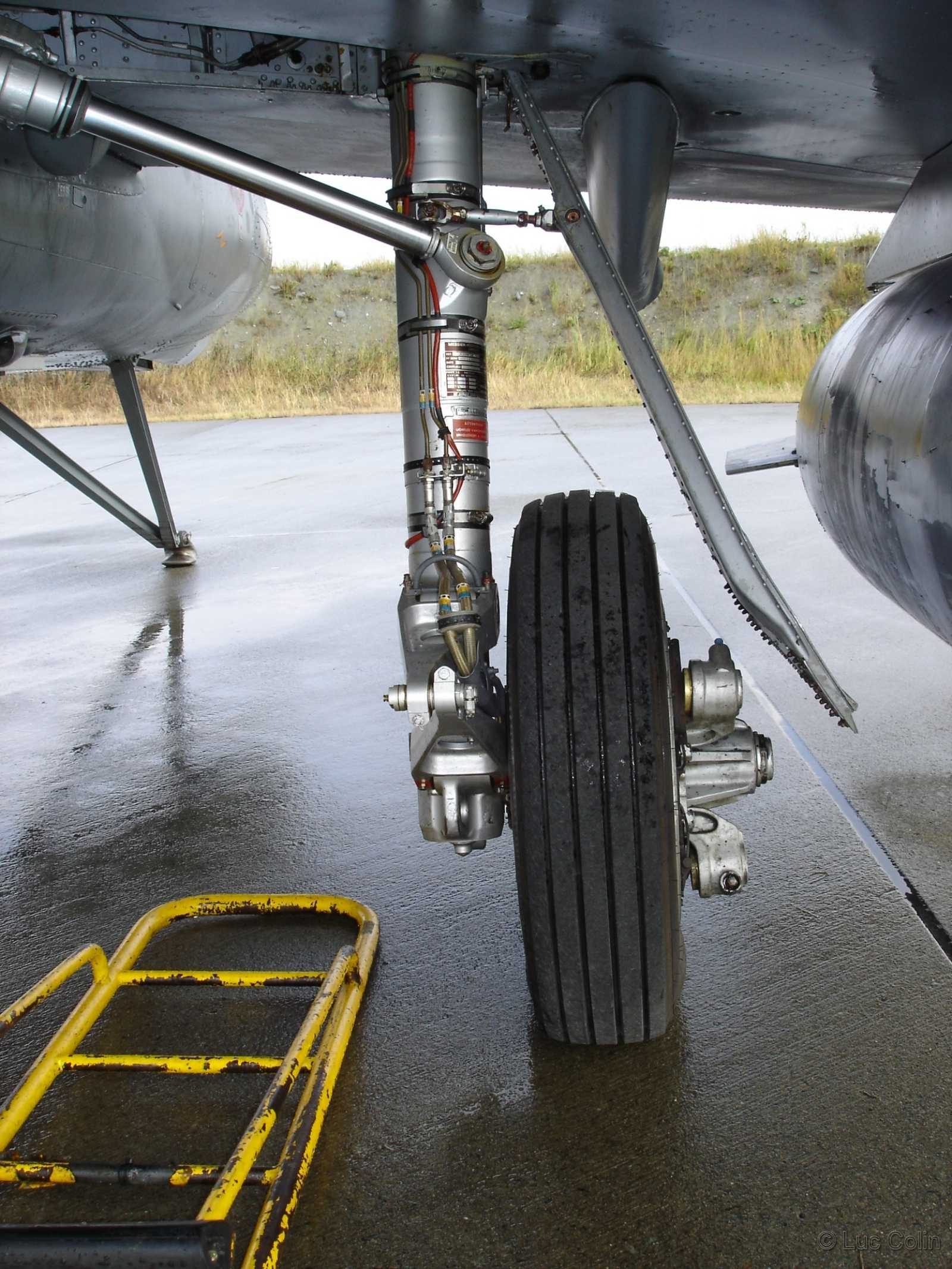
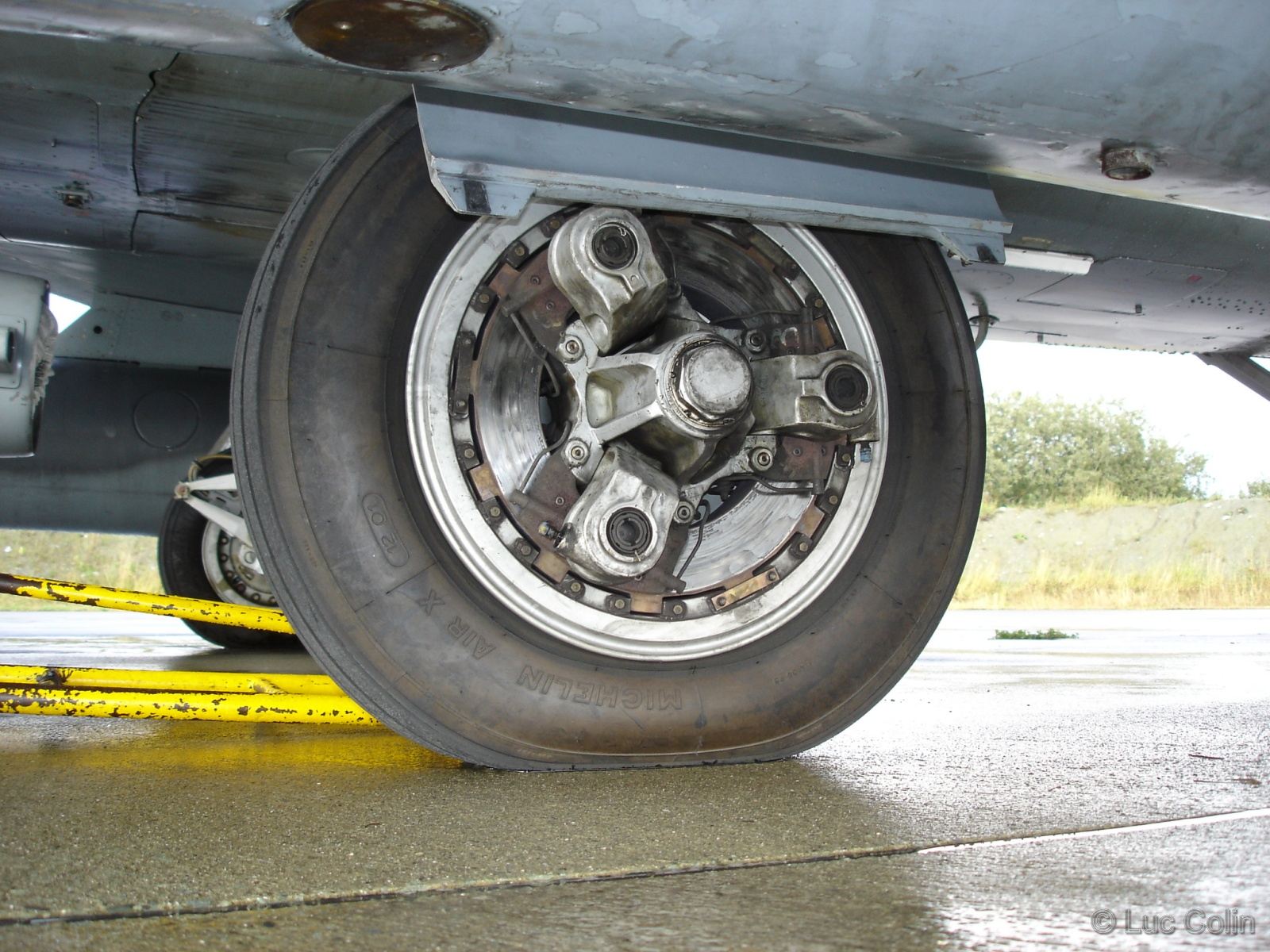
Lastly for now on the main wheels, you do not need most of this low poly detail that is going to waste and just going to cause problems.
Image
The Disk Break base itself should just be removed and just textured on, as it is being a thin mesh, it will just zfight like crazy and wastes tris and UV space and will even look rounder being a texture. The other parts too can be much simpler, and as I would recommend, you give their detail though making a high poly model of the wheel and then baking the details from that onto these parts, which will result in a far better and low poly finish all round, and all you need for that from the low poly side, is just a simpler inside, and those three outer bits, which again can be much simpler than they are now ;)
But even if not going the high poly baking route, you still don't need all this low poly detail for them and a simpler thing would still be best, just the HP normal bake would give by far the best and most realistic finish ;)
Not the best pic but note here how on the low poly part of the model, the inner part of the wheel is a really simple block for a pretty complex bolt fitting bit, but with the high poly normals baked on it passes off really well:
Image


That's all for now, is more stuff but will give you feedback on that later and hopefully you can find the issues yourself and fix them ;)

Last edited by Rhino on 2016-11-29 22:30, edited 1 time in total.
Image
anantdeathhawk
Posts: 641
Joined: 2015-11-12 21:11

Re: [WIP] [Vehicle] Super Etendard

Post by anantdeathhawk »

Update:
Tris increased to 8073 inclusive of blueprints so around 300 tris is deductible from the number.

Completed:
1.Arrestor hook with its slot, slot is not close to the real life thingy.
2.More smoother body.
3.Alerions.
4.Foldable wings.
5.Removed disk brake(low poly geometry) and added a regular 5 sided cylinder as the axle of the rear wheels.
6.The front corrected,cockpit glass reworked(little bit),cockpit is also relatively smoother now.
7.Removed the stablizers' base and added stablizer flap.
8.Exhausted is rounder than before.

To be done:
1.High poly of the nose section.
2.High poly of the wheels.
Question:
Will the high poly bake of the nose be done same as that of the wheels?

Screens:
Image
Image
Image
Image
Image
Image
Image
Image
Image
Image
Image
Image

Video(soon).

Thanks.
Rhino
Retired PR Developer
Posts: 47909
Joined: 2005-12-13 20:00

Re: [WIP] [Vehicle] Super Etendard

Post by Rhino »

Nice work but still, lots of areas you can still optimize. Try using the Optimize modifier on your mesh just to show you where you can optimize, but I wouldn't recommend collapsing it onto your mesh as it tends to cause more problems than its worth and also often misses out lots of areas you can optimize as well so don't rely on it fully to show you where optimizations can be made.

Fuselage looks much nicer now but you should continue the smoothness all the way to the exhaust, as that is one of the things that needs it the most as it silhouettes. As mentioned above there are also lots of areas you can still optimize on the shape of your fuselage, only spend the tris where it actually helps affect the shape and not in others, and also spend most of the tris on areas that silhouette against the background as they will be the most apparent to the smoothness of the object itself.

As for the wheel, first of all you don't want the axel so much inside the mesh, just means wasted UV/Texture space. Only have faces that are visible and cut off the ones that are not to minimise UV usage as much as possible ;)
Next I didn't mean remove the entire brake assembly and the wheel hub, I only meant remove the mesh of the brake disk which is the flat bit on the bottom.
Image
You still want a low poly mesh for the wheel hub and the pistons as they silhouette quite a lot and without a basic mesh there, there isn't that much a normal map can do to make it look convincing.
Image
Image
As such you want something low poly like this, really quick mockup, could be better:
Image
Image
For the normal map to go on, then the normal map has the 3D foundation to give it a silhouette but it can then put all the tiny details in though the lighting of it ;)

Wing tweaks look good although could save a few tris by removing these verts which from what I can see, aren't needed? Vert removes pointed out with "X"s and lines are new edges.
Image

Hook looks good to me although think the end doesn't need some many edges as its pretty small and isn't going to be seen much and currently is higher detail than most things around it :)

But ye, other than that looks good on the bits I talked about before, just need to mainly work on your optimization and will hopefully give you feedback on the other areas at some point in the future but try and spot them yourself if you can ;)
Image
anantdeathhawk
Posts: 641
Joined: 2015-11-12 21:11

Re: [WIP] [Vehicle] Super Etendard

Post by anantdeathhawk »

Update:
Wheel (rear)
Wheel hub attached to the wheel (modelled out of the wheel), Tris:748, originally the wheel's tris was 250.This may be over modelled according to your quick mockup.

Screens:
Image
Image
Image
Image
Image

Wing optimization done as said above.
Image

Reduced the details on the arrestor hook.Optimization, could reduce 100 tris from the Nose, but will look jagged from only some particular angles,other than that looks the same from top and side view.Trying to optimize as much as i can.

Thanks.
Rhino
Retired PR Developer
Posts: 47909
Joined: 2005-12-13 20:00

Re: [WIP] [Vehicle] Super Etendard

Post by Rhino »

Sorry but I think there is a bit of a language barrier here or something. Your wheels are back to being far to high poly. You only want a simple mesh for the inside like I posted above: http://i.imgur.com/wsBCYHF.png

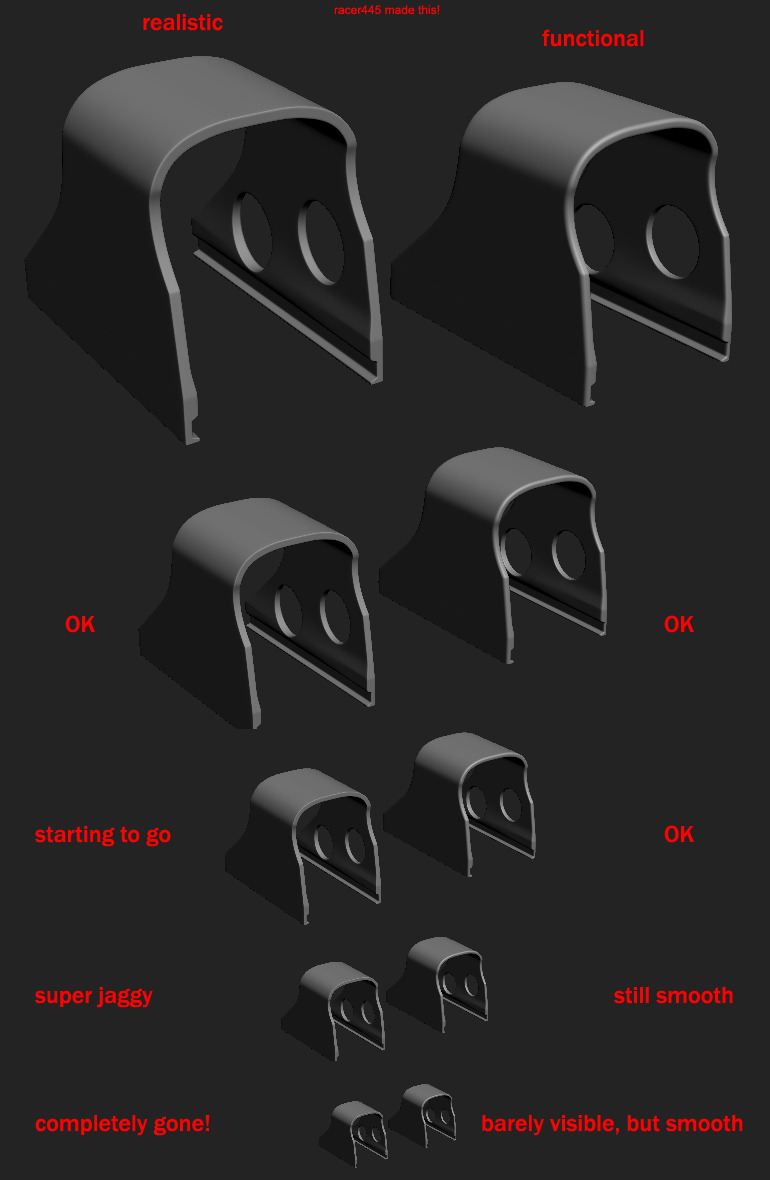
A good example of this would be the caps on my Exocet Missile Launcher:
Image

I needed to make them pretty low poly, and as such, each cap is only 36tris, but after applying the normal map from my high poly model, it looks far more detailed than it really is and only on close inspection can you see how low poly it is.
Image

High Poly model:
Image

Now like the cap on the Exocet Launcher, all you need is a low detailed base, and let the normals do the rest of the work ;)
Image
agus92
Posts: 280
Joined: 2016-01-03 11:11

Re: [WIP] [Vehicle] Super Etendard

Post by agus92 »

Anant, I believe Rhino wants you to remove the circular disk of the brakes. Possibly the chamfer around the brake as well.
Rhino
Retired PR Developer
Posts: 47909
Joined: 2005-12-13 20:00

Re: [WIP] [Vehicle] Super Etendard

Post by Rhino »

agus92 wrote:Anant, I believe Rhino wants you to remove the circular disk of the brakes. Possibly the chamfer around the brake as well.
More as per post #88, more like this, with only a very basic low poly base for the normal maps to go onto that silhouettes the details, but the mesh itself doesn't give it the details, the normal map does:
Image

But as I said before, could be better and needs to be welded to the main wheel too.

Need to also remember this is a small part of the model that won't be seen that much either since most of the time, they will be folded away inside the wing and as such, very few polys should be spent on them.
Last edited by Rhino on 2016-12-09 09:43, edited 1 time in total.
Image
anantdeathhawk
Posts: 641
Joined: 2015-11-12 21:11

Re: [WIP] [Vehicle] Super Etendard

Post by anantdeathhawk »

Update:
Optimized rear wheel,but could be opimized a bit more, Tris-268.I'll adjust the model to cover the high poly model's details,once the high poly model is decided, as right now the wheel hub modelled on the new wheel is a bit smaller in size than the high poly quoted below.
Screens:
Image
Image
Image
Image
Image

Is this one good for the high ploy bake? If yes will add more details to it.
Image

Thanks.

To agus92:Thanks for the input :smile: .
[R-DEV]Rhino:No there's no language barrier just didn't quite understood how to go about it, but the example made it very clear, thanks and is that a new asset for the Falklands :mrgreen :?
Rhino
Retired PR Developer
Posts: 47909
Joined: 2005-12-13 20:00

Re: [WIP] [Vehicle] Super Etendard

Post by Rhino »

anantdeathhawk wrote:Update:
Optimized rear wheel,but could be opimized a bit more, Tris-268.I'll adjust the model to cover the high poly model's details,once the high poly model is decided, as right now the wheel hub modelled on the new wheel is a bit smaller in size than the high poly quoted below.
LP model needs to cover the entire HP model other than a few small details, but the main part of the mesh should be the same size or bigger.
anantdeathhawk wrote:Is this one good for the high ploy bake? If yes will add more details to it.
Image
Nope, a high poly model needs to be much more detailed than that. Not watched this video but looks to cover the basics, although I wouldn't worry too much about this now, focus on getting the low poly model done then you can focus on this afterwards:

anantdeathhawk wrote:[R-DEV]Rhino:No there's no language barrier just didn't quite understood how to go about it, but the example made it very clear, thanks and is that a new asset for the Falklands :mrgreen :?
Guess the Object - Project Reality Forums
Image
anantdeathhawk
Posts: 641
Joined: 2015-11-12 21:11

Re: [WIP] [Vehicle] Super Etendard

Post by anantdeathhawk »

Update:
Optimized the fuselage little bit more(as much i could).Fixed some smoothing groups as well.

Total tris while in flight(ie without wheels and suspension system)-4948(although the screen shows 4748 ie without the rudder)
Screens:
Image
Image
Image
Image
Image

High poly rear wheel still in progress:
Screens:
Image
Image
Image
Image
Image
Image
Image
Image
Image

Thanks!
agus92
Posts: 280
Joined: 2016-01-03 11:11

Re: [WIP] [Vehicle] Super Etendard

Post by agus92 »

anantdeathhawk wrote:Update:
Optimized the fuselage little bit more(as much i could).Fixed some smoothing groups as well.

Total tris while in flight(ie without wheels and suspension system)-4948(although the screen shows 4748 ie without the rudder)
Screens:
Image
Image
Image
Image
Image

High poly rear wheel still in progress:
Screens:
Image
Image
Image
Image
Image
Image
Image
Image
Image

Thanks!

ooh, looking good!
Rhino
Retired PR Developer
Posts: 47909
Joined: 2005-12-13 20:00

Re: [WIP] [Vehicle] Super Etendard

Post by Rhino »

Looking good! Think there are probably a few places you can still optimise the fuselage thou. Have you tried what I suggested before about applying the optimise modifier with a low threshold of 1 JUST TO SEE where you can optimise? As I said before, don't collapse it into your model as it tends to screw up your mesh more than it helps in most cases and it misses quite a few areas it can optimize too so don't rely on it fully, but it's a good and quick tool to see places where you can optimize.

Also there is no point counting the tris of your wheels etc removed, since even with them folded up and no longer visible ingame, they will still need to be rendered by the clients gfx card, if they are still in the LOD the player is seeing but the wheels etc can be removed in later LODs because of this and they are small. As such, you should count them in your "3rd person LOD0" tri count, along with things like the fuel tanks etc.

Your High Poly Wheel is looking good although you've made it "too realistic" for normal map baking to work well with it :p

Taking the thread of your wheels, right now its a vertical dip which won't come out at all well in the normal maps as the massive dip will be hardly spread over any pixel area. As such you want a less realistic gradual slope, rather than a vertical drop, for it to come out well on the normal map:
Image

A couple of my wheels as examples:
Image
Image
Image

Image
Image
Image

As such you want something more like this:
Image

Your edge roundness/thickness also needs to be a lot bigger to come out well, especially if you only have a few pixels on the texture for the normal to go on but also for it to show up for the players even if you do have a super high rez texture, small ones still won't show up unless super close:
Image

Also don't bother modelling things you don't need like the axel, since you don't need to bake that unless it has some details on it that you need, otherwise it will just get in the way of what you do want to bake.

Some more tips here: Normal Map Modeling - polycount


Keep up the good work! :D
Image
anantdeathhawk
Posts: 641
Joined: 2015-11-12 21:11

Re: [WIP] [Vehicle] Super Etendard

Post by anantdeathhawk »

Update:
Hello.
total tris is 7884(3rd person LOD0).
Image
Yes i did use the optimize modifier as well as multirez modifier to see, but going based on its suggestion with a threshold of 1 meant disrtortion in shape.To maintain smooth shape throughout, it has close to minimum verts around the fuselage. :neutral:

Thanks for the explanation, really helpful and that wiki too,got to know little more about modelling.Took some time to read the tutorials,hence the delay in posting. :)

Changes:
1.Softened the edges on the high poly wheel.
2.Made the low poly wheel match the silhouette of the high poly wheel.
3.Tried some optimizations on the fueslage,but could do very minor changes.

Screens:
High poly wheel

Image
Image
Image
Image
Image
Image
Image

Low poly wheel

Image
Image
Image
Image
Image

Rear and front suspensions(Axle?? Front landing gear pivot for steering the aircraft??)
Image
Image

Multirez optimizer:
Image
Image

Video :( optimize modifier)


Thanks !
Last edited by anantdeathhawk on 2016-12-21 15:16, edited 1 time in total.
Rhino
Retired PR Developer
Posts: 47909
Joined: 2005-12-13 20:00

Re: [WIP] [Vehicle] Super Etendard

Post by Rhino »

Nice work! :D

The High Poly wheel is looking much better, a few small errors but they hopefully won't be an issue and can be painted out afterwards if they are.

Anyways your LP wheel could be optimized somewhat, dosen't need that many tris and could possibly be optimized more from here even:
Image

As for your Axel, the cream cylinder in this pic: http://i.imgur.com/9RE820A.png
Firstly it shouldn't be that long, most of its face area is inside the wheel and that's just wasting UV area and the like so you should only have the faces where they are seen and only clipping into the mesh if necessary for other reasons.
It also doesn't need its front and back faces, and it could also have far fewer sides since a player isn't going to see it hardly and all it needs to do is look round and won't see any silhouettes to see how round it actually is.

The front suspension and steering arm could also be optimized a bit, with also those cylinders needing their smoothing fixing up: http://i.imgur.com/jL5uPcb.png

As for your optimize (and multirez but that isn't so good as that will change the shape significantly to reduce tris only based on what % your aiming for, but can still help too sometimes) modifier not showing you where to optimize, tbh its acting pretty oddly for you. Here is a quick example of how it should work.

Unoptimized Mesh with lots of useless tris:
Image
Image

With Optimize Modifier applied:
Image
Image

As you can see for me, it clearly shows the new tri setup and also the shape of the mesh is unchanged, only the smoothing is changed slightly. Although it has missed a few areas where it could easily optimize the mesh, like I said it should just be used to help show you where you can optimize and again, don't use it to actually optimize a mesh (unless you are sure it is doing exactly and only what you want, it messes up UVs etc too btw even if the mesh is perfect, which is unlikely, so can't be used for LODs either).

My guess is this may be caused by all your other modifiers you have stacked on the mesh. I would recommend you collapse them all (and if you really need them, which I doubt, you can just make a clone of your mesh to do this, but you will need to collapse them all sooner or later for export), and then apply the optimize modifier on, with also no mesh selection method enabled (vertex, edge, face etc) and then hopefully it should show you where you can optimize. Also if a threshold of 1 is too much, try lower than that, ie, 0.1 etc.


Anyways keep up the good work :)
Image
anantdeathhawk
Posts: 641
Joined: 2015-11-12 21:11

Re: [WIP] [Vehicle] Super Etendard

Post by anantdeathhawk »

Changes:
1.Optimized front landing gear and made the lower part separate so the jet could be shown to steer.Also attached the front cylinder on the FLG, which was a floating object before.
2.Corrected the errors on the rear wheel low poly version.
3.Rear wheel axle has been optimized with top and bottom faces deleted.

Unfortunately collapsing all the other modifiers and applying the optimize modifier then didn't help, it was still not working properly,did exactly as you suggested and i also tried to do the same with clone. :-(
Still optimized here and there but was like 10~15 tris.I did use the optimize modfier for the front landing gear optimization.

Screens:
Image
Image

Video:
Collapsed the stack,but still no luck.


Front landing gear.


Thanks.
Post Reply

Return to “PR:BF2 Community Modding”