
Yes, punish it!hall0 wrote:Bad Computer ?
strange "lag"
-
LeoBloom.
- Posts: 138
- Joined: 2007-03-02 04:40
Films also use motion blur, how much the eye can detect can be debated.Jonny wrote:Films are 24 FPS, 40-50 is much more than what is needed for smooth animation, if you get MUCH more than 24, ie 60+, then turn your graphics settings up a bit untill you get a steady 40-50 FPS, I play with about 30-45 ish and have few problems with lag that I don't get on the desktop (I have no idea why I la on the desktop & I can fly planes on Kashan, the only problem is that I am a **** pilot so I only do that on a local server) and the extra, unneeded FPS will act as a buffer if you get a little lag in the system.
-
S.P.C-[Reality]-
- Posts: 475
- Joined: 2007-06-24 15:56
i did have the same prob with albasra in 0.5 which the game tottaly locked up and sent me back to the main menue saying your connection has been lost or sth like that and i tried again and it again locked up but started working again(with alot of lag). and i thought it was because i had low RAM(512mb) but now on 0.6 i dont get that prob any more, except its too lagy at the begining of that map!!


-
77SiCaRiO77
- Retired PR Developer
- Posts: 4982
- Joined: 2006-05-17 17:44
-
Swe_Olsson
- Posts: 1030
- Joined: 2007-04-30 17:45
-
ljufmennid+1
- Posts: 23
- Joined: 2007-07-21 22:47
checked that proplem, punk buster is not chancing in CPU usage but BF2 is, I think my proplem lays in my graphic card, Nvidia geforce 7800Swe_Olsson wrote:Punk buster has been updated, and increased your CPU usage, i would sudjest "minimizing BF2 check your CPU usage while in game. and check processes for whats causing it.
Not sure what it is but sure is "shitty" when your flying with a full merlin and little before you land it flips over, I love flying helos and always trying to get better but its not happening with this proplem

Funny think is that I have come up with a way to fly with little less proplem and the trick is to use the throttle as little as I can because when Im driving the jeep and I get these graphic lag Im never sure were or what tree im gone end up crashing into and well with the helos I normaly just end up "site ways" or "upsite down"
What is the commant to bring up FPS? in battlefield/PR?, I need to fix this proplem, love the game, training or playing nearly every day for least an hour and Im trying really hard not to let this ruining my game spirit....
P.S: project reality crew I played nearly every army sim that you can find in first person and I just love your game!!!, think it was about time for some *** kissing from me!!!!
-
El_Vikingo
- Posts: 4877
- Joined: 2006-11-27 01:50
-
Long Bow
- Posts: 1100
- Joined: 2007-03-21 14:41
Some of the 8800 series have a memory bleed problem. The FPS slowly drop and drop but if you alt+tab out of the game and then maximize it again the memory is back to normal and the fps back up. Nvidia is aware of it and working on it  Not sure if this is what your experincing but it may be something to try?
Not sure if this is what your experincing but it may be something to try?-
VipersGhost
- Posts: 1171
- Joined: 2007-03-27 18:34
15 FPS??? Good lord thats unplayable, are you serious? I have that same graphics card and get about 20-35 FPS on High setting, low shadows, meduim textures. AA off.El_Vikingo wrote:CPU usage on my PC ingme is 100%, 7600gt medium settings, low lighting, 15fps.
BTW does lowering the lighting setting give you a noticable jump?
-
ljufmennid+1
- Posts: 23
- Joined: 2007-07-21 22:47
Okey I tried every possable "setting" in the PR, nothing is helping, I dont know what this is but I´m leaning on "memory leak" what ever that is, but shoul´d that work in that way that slowle your computer starts to lag but not instant short burst of graphic lag?, just like internet lag?, this is starting to freak me out because my graphic card is EVEN design to be apple to move more date then other similiar cards
MY GRAPHIC CARD IS A MONSTER!!!! and not the good kind
Here are my stats so if some one here is Dr Frankenstein of hardware PLEASE HELP US!!! or just me
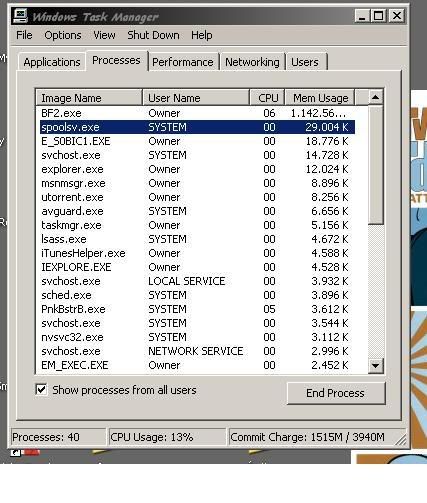
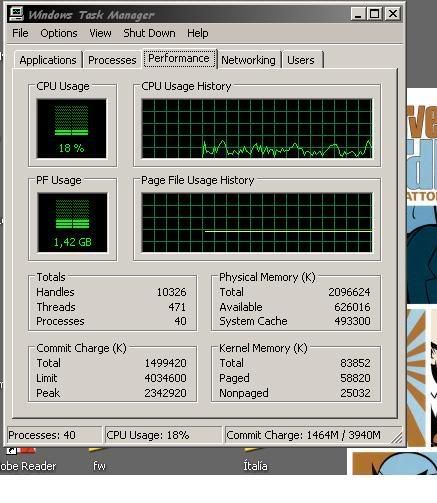
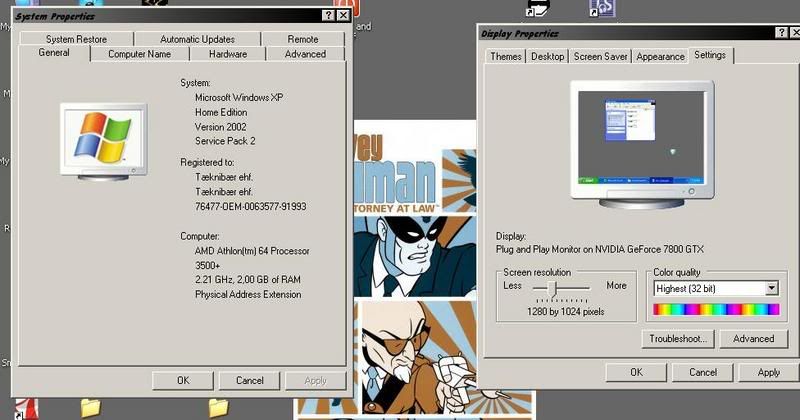
MY GRAPHIC CARD IS A MONSTER!!!! and not the good kind
Here are my stats so if some one here is Dr Frankenstein of hardware PLEASE HELP US!!! or just me
-
El_Vikingo
- Posts: 4877
- Joined: 2006-11-27 01:50
I have had this problem since 0.6, do not ask me why. Maybe the CPU is dieing?VipersGhost wrote:15 FPS??? Good lord thats unplayable, are you serious? I have that same graphics card and get about 20-35 FPS on High setting, low shadows, meduim textures. AA off.
BTW does lowering the lighting setting give you a noticable jump?

If you are reading this dont stop, cause if you do, I'll kick you in the balls.
-
S.P.C-[Reality]-
- Posts: 475
- Joined: 2007-06-24 15:56
-
Long Bow
- Posts: 1100
- Joined: 2007-03-21 14:41
Download Fraps, install and run it in the background while playing, it should display a number in the top left corner of your screen = fps.'S.P.C-[Reality wrote:-;471103']hey budy can you tell me how i can find out how many frames per second im playing?! thanx
There is also a command you can put into the game console to tell you the same thing though I don't know it.
ljufmennid+1 Ok back on topic. You have 40 processes running, which is a bit much. I would try clicking on the following and dissabling prior to launching PR:
EM_exec.exe
E_SOBIC1.exe
msnmsgr.exe
ituneshelper.exe
avguard.exe
utorrent.exe
The utorrent may be causing you lag because it is chewing up bandwidth? I would either shut it down before playing or put caps on the up load and download limits. The msnmsgr I would dissable from running the service at all, same with itunes. AVG is fine but I would disable it before playing but it shouldn't be an issue if you wan't to leave it. The E" ".exe programs I'm not sure what they are but know they are not core services or programs. Any idea what they are supporting: mouse software or monitor software?
Try dissabling these first through task manager to see if it helps. After that if you like then worry about permanently dissabling some of them or forcing them to start manually. I can give you some help with this if you like.
-
ljufmennid+1
- Posts: 23
- Joined: 2007-07-21 22:47
Long Bow wrote:Download Fraps, install and run it in the background while playing, it should display a number in the top left corner of your screen = fps.
There is also a command you can put into the game console to tell you the same thing though I don't know it.
ljufmennid+1 Ok back on topic. You have 40 processes running, which is a bit much. I would try clicking on the following and dissabling prior to launching PR:
EM_exec.exe
E_SOBIC1.exe
msnmsgr.exe
ituneshelper.exe
avguard.exe
utorrent.exe
The utorrent may be causing you lag because it is chewing up bandwidth? I would either shut it down before playing or put caps on the up load and download limits. The msnmsgr I would dissable from running the service at all, same with itunes. AVG is fine but I would disable it before playing but it shouldn't be an issue if you wan't to leave it. The E" ".exe programs I'm not sure what they are but know they are not core services or programs. Any idea what they are supporting: mouse software or monitor software?
Try dissabling these first through task manager to see if it helps. After that if you like then worry about permanently dissabling some of them or forcing them to start manually. I can give you some help with this if you like.
Thanks Longbow, well I normali never have Utorrent and other programs like that opened while playing, well another think I´m gone try to update drivers...
P.S that E" ".exe program I have NO clue what is, I think its a left over from a virus I had couple of weeks ago...
But thinks alot for your help!!!
-
Nickbond592
- Retired PR Developer
- Posts: 2713
- Joined: 2007-01-30 18:16
-
ljufmennid+1
- Posts: 23
- Joined: 2007-07-21 22:47
'[EtE wrote:nickbond592;471881']the command for the FPS ingame is
renderer.drawfps 1 for on and
renderer.drawfps 0 for off
to acces the console press ` ( above TAB )

Hehe thanks but i think I solved it, at least got it better, Got the new patch for the software for the graphic card and finally in there I could find the Setting to disable "AA", so the card does not draw "AA" and nether the game, then I just went trough all my hardware and updated what I could
Well anyways thanks guys
Cheers and good night
-
Mongolian_dude
- Retired PR Developer
- Posts: 6088
- Joined: 2006-10-22 22:24


-
Long Bow
- Posts: 1100
- Joined: 2007-03-21 14:41
Setting the mood nicely, Mongolian.[R-MOD]Mongolian_dude wrote:Iv noticed a lot more lag, for everyone, and servers being crappy or going down recently....Ever since...PB update
*Tense sticato strings, like when you find out the evil plot on a film*
...mongol...
I to am having weird lag issues lately. Unfortunately it coinsides with me installing my 8800GTS, which is also having some graphical issues that I hope are driver related.
How many people here are running 8800 series cards currently and what driver are you using? I'm curious to see if there is some dirver issues going on with these cards?
8800GTS 640mb 163.44
Windows XP